Home Lab: SOC Environment in Microsoft Azure
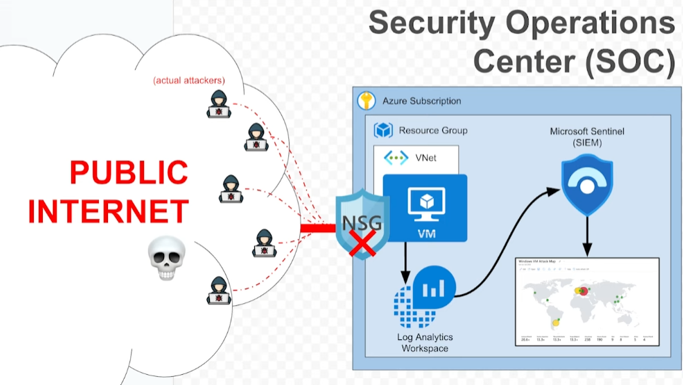
Home Lab: SOC Environment in Microsoft Azure
Home Lab: SOC Environment in Microsoft Azure
Overview
This project demonstrates a fully functional Security Operations Center (SOC) home lab built using Microsoft Azure and Microsoft Sentinel. The lab includes a honeypot virtual machine exposed to the internet, centralized log ingestion and analysis, event enrichment, and threat visualization through dashboards and geolocation maps.
Although Microsoft Defender for Cloud was not integrated during this project, I will be exploring it in future projects to practice the full SIEM + XDR functionality.
Objectives
- Deploy a honeypot virtual machine (VM) in Azure.
- Ingest Windows security logs using Log Analytics Workspace and Microsoft Sentinel.
- Simulate attack behavior (failed logins, brute force attempts).
- Analyze logs using Kusto Query Language (KQL).
- Enrich logs with geolocation data using a custom watchlist.
- Visualize threats using Sentinel Workbooks.
Lab Writeup:
Home Lab: SOC Environment in Azure
What I Learned
- How to build and secure cloud infrastructure using Azure.
- How SIEM systems like Microsoft Sentinel ingest and process logs.
- How to write and optimize KQL queries to detect events.
- How to enrich log data using external watchlists (GeoIP).
- How to build security dashboards that highlight real-world attack activity.
- The foundations of what a SOC analyst does in a real job role.
Future Improvements
- Integrate Microsoft Defender for Cloud for SIEM + XDR functionality.
- Add alerts and playbooks to trigger automated responses.
- Simulate more complex attack scenarios (e.g., lateral movement, privilege escalation).
- Forward logs from additional sources (Linux VM, Azure services, etc.).
- Use Sysmon for deeper endpoint visibility.
This post is licensed under CC BY 4.0 by the author.