CyberDefenders: Brave Lab

CyberDefenders: Brave Lab
Overview
Memory forensics is a vital component of modern digital investigations, providing access to volatile data that reveals a system’s live state at the moment it was captured. Unlike traditional disk analysis, memory forensics allows analysts to examine active processes, network activity, user interactions, and artifacts that may not leave a permanent trace on disk. This lab challenges you to delve into a memory image acquired from a Windows machine and piece together critical evidence to reconstruct user activity and potential malicious behavior.
In this walkthrough, we leverage the powerful Volatility3 framework to dissect the memory image. As one of the leading tools for memory analysis, Volatility3 offers a robust set of plugins to investigate processes, registry data, and network connections, among other artifacts. Complementing this, tools such as hex editors and registry analysis enhance our ability to identify and interpret hidden evidence. Together, these tools will guide you through extracting and interpreting key information to build a timeline of events.
Your role as an investigator in this lab is to carefully analyze the memory image and uncover critical details about the system’s activity. The lab is designed to sharpen your skills in areas such as process analysis, identifying network connections, tracking application usage, and extracting meaningful registry data. Each question builds on the previous one, deepening your understanding of memory forensics and guiding you through practical techniques for uncovering evidence.
By the end of this lab, you will have gained hands-on experience in memory forensics, learning how to efficiently analyze volatile data and connect the dots between artifacts to form a coherent narrative. This walkthrough demonstrates the power of memory forensics as an indispensable tool in digital investigations.
Question 1
Question 1: What time was the RAM image acquired according to the suspect system? (YYYY-MM-DD HH:MM:SS)
Memory forensics is an essential aspect of digital investigations that focuses on analyzing volatile data stored in a system’s RAM. Since RAM contains active processes, temporary data, and system states, it is invaluable for uncovering evidence of malicious activity, such as malware, encryption keys, and network communications, that are not stored on persistent storage. For this analysis, the Volatility framework is utilized, specifically its latest iteration, Volatility3. This open-source tool provides powerful plugins for parsing and interpreting memory dumps from various operating systems, including Windows.
The windows.info plugin within Volatility3 is designed to extract metadata from a memory image, offering insights into the system’s environment at the time the memory snapshot was captured. This metadata includes details about the operating system version, the number of processors, and the system’s date and time. Using this plugin, one can identify the exact timestamp when the memory image was acquired, which is critical in understanding the context of the investigation.
1
python3 ~/volatility3/vol.py -f temp_extract_dir/c49-AfricanFalls2/20210430-Win10Home-20H2-64bit-memdump.mem windows.info
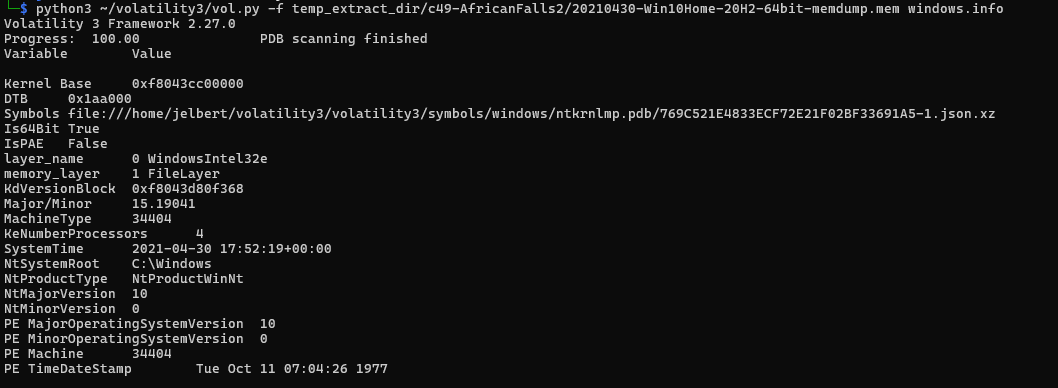
Upon analyzing the memory image using this tool, it is evident that the system’s reported time at the moment of capture was 2021-04-30 17:52:19 UTC. This timestamp aligns with the SystemTime value obtained from the memory dump, reflecting the precise moment the data in RAM was preserved. Such details are crucial in correlating events and timelines, particularly in forensic investigations where establishing an accurate chronology is key.
Question 2
Question 2: What is the SHA256 hash value of the RAM image?
Hashing is a process used in cybersecurity and data integrity checks to transform data into a fixed-size string of characters, which represents the data’s unique fingerprint. A cryptographic hash function, such as SHA256, ensures that even a small change in the input data results in a completely different hash output. This makes hashing an effective tool for verifying data integrity, as any alteration to the original data would produce a mismatch between the computed hash and the expected hash. In digital forensics, hashing is crucial for verifying the authenticity of forensic images and ensuring they have not been tampered with during an investigation.
1
sha256sum temp_extract_dir/c49-AfricanFalls2/20210430-Win10Home-20H2-64bit-memdump.mem

The output of this command provides the hash value and the file path. From the analysis, the computed SHA256 hash value for the RAM image is 9DB01B1E7B19A3B2113BFB65E860FFFD7A1630BDF2B18613D206EBF2AA0EA172. This value uniquely represents the memory image at the time of its capture, and it can be used to confirm its integrity throughout the forensic process. Any subsequent hashing of the same file should produce this exact hash value, provided the file remains unaltered. This ensures that the memory image analyzed is authentic and has not been tampered with.
Question 3
Question 3: What is the process ID of “brave.exe”?
In memory forensics, identifying processes running in a system is a fundamental step in understanding the state of the machine and detecting anomalies. Volatility3’s windows.pstree plugin is often used for this purpose, as it visualizes the hierarchical relationship of processes in a memory image. It enables forensic analysts to identify running processes, their parent processes, and associated metadata, such as process IDs (PIDs).
1
python3 ~/volatility3/vol.py -f temp_extract_dir/c49-AfricanFalls2/20210430-Win10Home-20H2-64bit-memdump.mem windows.pstree | grep brave.exe

From the output, the brave.exe process is identified with a Process ID (PID) of 4856. Additional details, such as the executable’s file path, show that it is located in Program Files\BraveSoftware\Brave-Browser\Application.
The output also includes the start and end times of the process, indicating its active duration during the memory capture (17:48:45 UTC to 17:50:56 UTC).
This method combines the power of Volatility3 and Linux CLI filtering to quickly pinpoint specific processes, such as brave.exe, in the process tree. Identifying the PID (4856) is critical for further forensic analysis, such as examining threads, memory regions, or network connections associated with this process to determine its role in any potential malicious activity.
Question 4
Question 4: How many established network connections were there at the time of acquisition? (number)
The analysis of network connections is a crucial part of memory forensics, as it helps to identify active communications, potential exfiltration attempts, and connections to malicious servers. In Volatility3, the windows.netscan plugin is used to analyze network artifacts captured in the memory image. This plugin scans for network connections and sockets stored in memory and provides details such as the protocol, local and remote IP addresses, ports, connection state, and associated processes.
Note: I had to reinstall Volatility3 because I didn’t have all of the correct dependencies downloaded. Make sure to read the README files thoroughly!
1
python3 ~/volatility3/vol.py -r pretty -f temp_extract_dir/c49-AfricanFalls2/20210430-Win10Home-20H2-64bit-memdump.mem windows.netscan | grep ESTABLISHED

I used the -r pretty option in order to fix formatting issues. The output reveals a total of 10 established network connections at the time of memory acquisition. These connections are characterized by their local and remote IP addresses, associated process IDs, and timestamps of the activity. The established state indicates ongoing communication, which could be indicative of legitimate processes or potential malicious activity.
Question 5
Question 5: What FQDN does Chrome have an established network connection with?
A Fully Qualified Domain Name (FQDN) is a complete domain name that specifies its exact location in the domain hierarchy. It includes the hostname and domain name, providing a unique address for a device or service on the internet. For example, an FQDN might look like server.example.com, where server is the hostname, and example.com is the domain. FQDNs are critical for identifying and resolving specific servers or services, ensuring precision in network communications.
In the analysis of the memory image, a DNS resolution command was used to identify the domain name associated with a network connection involving Chrome. The command executed was:
1
nslookup -type=ANY 185.70.41.130
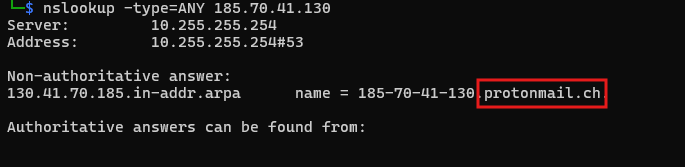
ProtonMail is a widely known encrypted email service, and its domain name in this context indicates a possible connection between the Chrome browser and the ProtonMail server at the time the memory image was captured.
Therefore, the domain associated with the established network connection involving Chrome is protonmail.ch.
Question 6
Question 6: What is the MD5 hash value of process executable for PID 6988?
To determine the MD5 hash value of the process executable for PID 6988, two critical steps were performed using Volatility3. These steps involve extracting the memory region associated with the process executable and then calculating its MD5 hash for verification purposes.
This command extracts the executable portion of the OneDrive.exe process and saves it as a dump file named 6988.OneDrive.exe.0x1c0000.dmp.
1
python3 ~/volatility3/vol.py -f temp_extract_dir/c49-AfricanFalls2/20210430-Win10Home-20H2-64bit-memdump.mem windows.pslist --pid 6988 --dump

Next, the MD5 hash of the dumped executable was calculated using the following command:
1
md5sum 6988.OneDrive.exe.0x1c0000.dmp

The output of this command provides the MD5 hash value for the dumped executable. The hash value is 0B493D8E26F03CCD2060E0BE85F430AF.
This hash uniquely identifies the contents of the OneDrive.exe process’s executable at the time it was captured in memory. Verifying this hash against known databases can help determine whether the executable is legitimate or malicious.
Question 7
Question 7: What is the word starting at offset 0x45BE876 with a length of 6 bytes?
To determine the English word starting at offset 0x45BE876 with a length of 6 bytes, a hex editor was utilized to analyze the memory dump at the byte level. A hex editor is a powerful tool that allows investigators to view and manipulate the raw binary data of a file, represented in hexadecimal format alongside its ASCII translation. This tool is essential for tasks such as examining file headers, locating specific strings, or analyzing memory dumps for hidden artifacts or data.
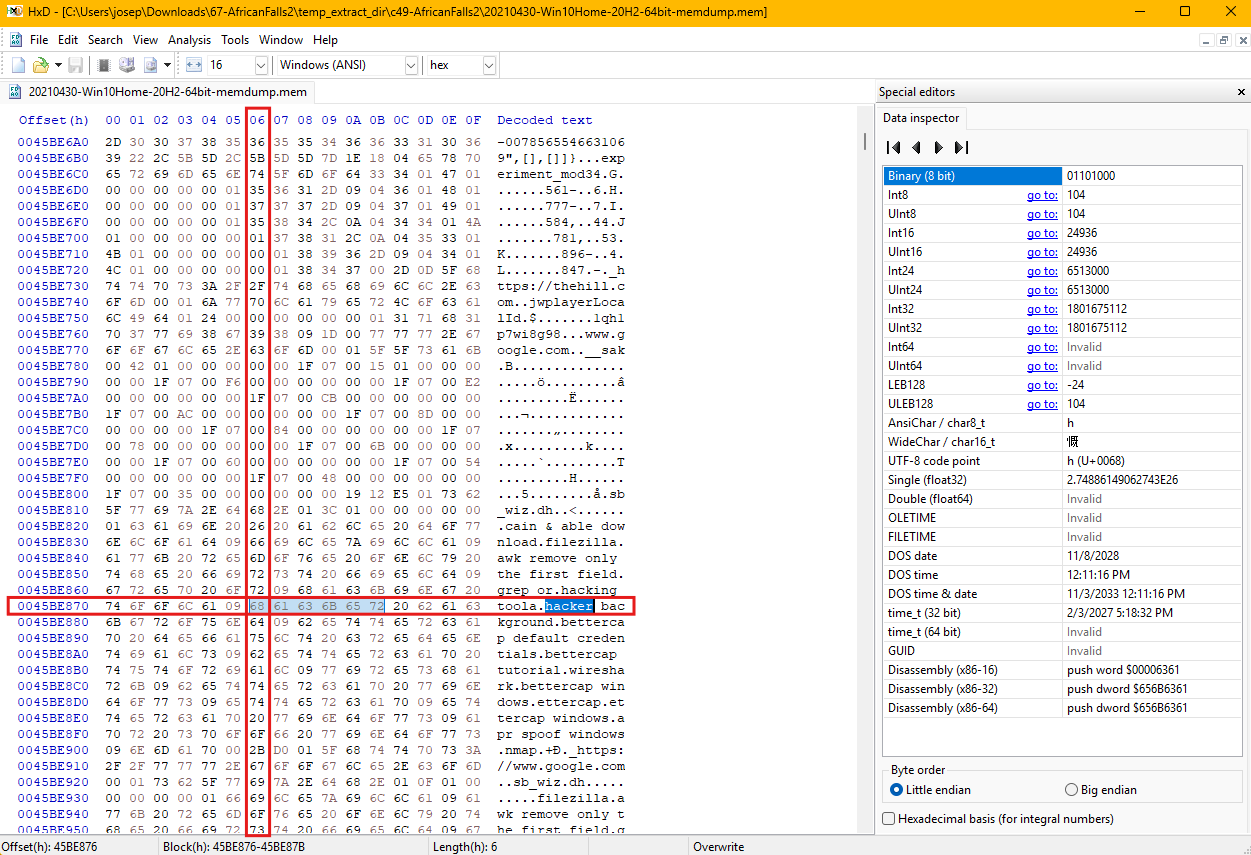
In this instance, the hex editor was used to open the memory dump file and navigate to the specified offset, 0x45BE876. The offset represents an exact location in the file, and the hex editor provides an interface to easily locate it. Upon reaching the desired offset, the ASCII column, which translates the hexadecimal bytes into readable characters, displayed the word beginning at this location. The data clearly showed the 6-byte word as hacker.
Question 8
Question 8: What is the creation date and time of the parent process of “powershell.exe”? (YYYY-MM-DD HH:MM:SS)
To analyze the processes captured in the memory image, the windows.pstree plugin from Volatility3 was used. This plugin is particularly useful for forensic investigations, as it provides a tree-like representation of all processes running at the time the memory was acquired. This hierarchical structure helps to visualize the parent-child relationships between processes, identify their associated metadata, and uncover potential anomalies in system activity.
The analysis began by running the windows.pstree plugin on the memory dump, redirecting the output to a text file for easier parsing. The command executed was:
1
python3 ~/volatility3/vol.py -r pretty -f temp_extract_dir/c49-AfricanFalls2/20210430-Win10Home-20H2-64bit-memdump.mem windows.pstree > pstree.out
This approach enables the investigator to review the output systematically using a text editor or command-line tools, especially when dealing with extensive output from large memory dumps. By searching for specific processes, such as powershell.exe, it becomes easier to locate relevant details.
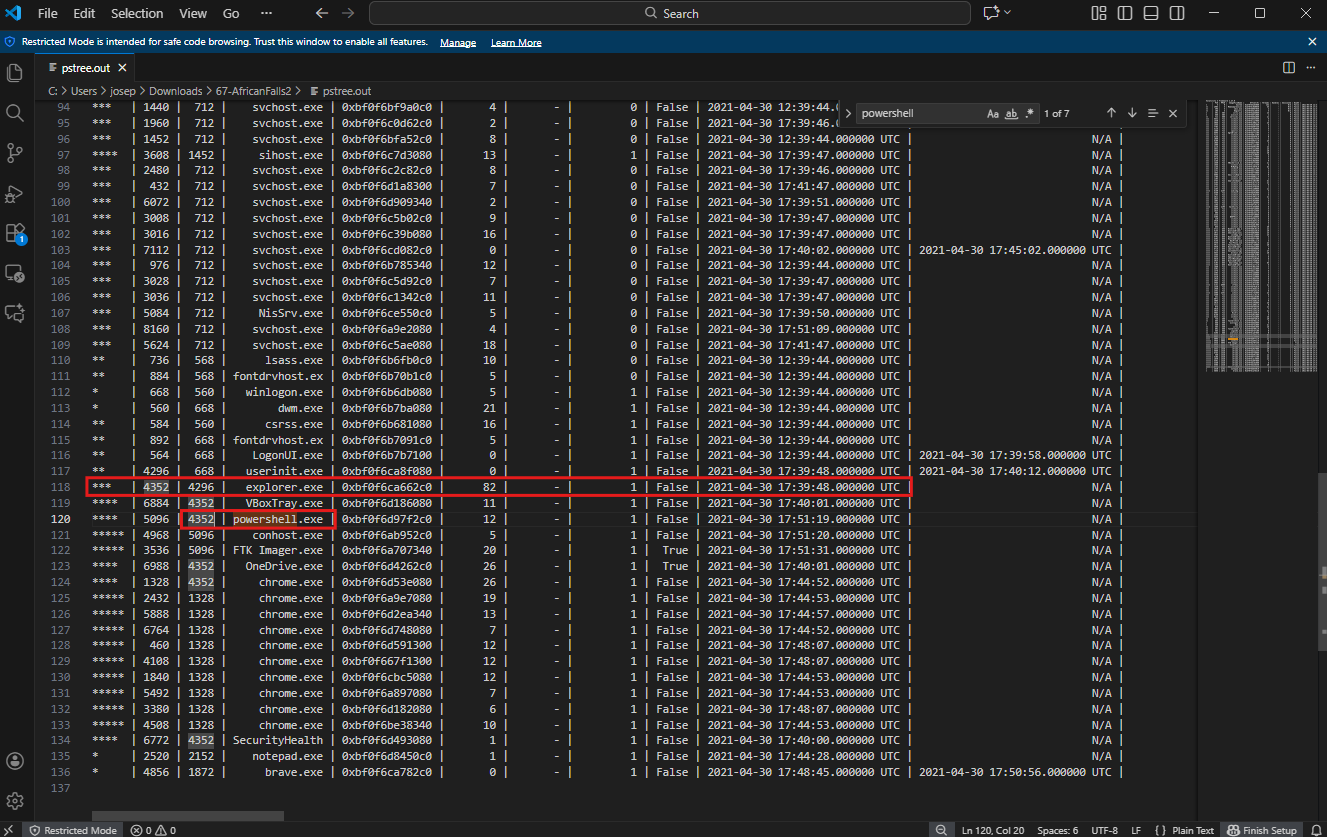
The investigation revealed the powershell.exe process with a Process ID (PID) of 5096. Its Parent Process ID (PPID) was identified as 4352, indicating that it was spawned by the explorer.exe process. The creation timestamp for explorer.exe was noted as 2021-04-30 17:39:48 UTC, providing a timeline for its execution.
This information establishes the process’s existence and its context within the system’s execution environment. The hierarchical view provided by the plugin is particularly valuable in this case, as it helps to identify the relationship between powershell.exe and its parent process, explorer.exe. Such details are essential for understanding whether this process was used legitimately or potentially exploited for malicious activity.
Question 9
Question 9: What is the full path and name of the last file opened in notepad?
To determine the full path and name of the last file opened in Notepad, the windows.pstree plugin was used to analyze the process tree in the memory image.
The analysis involved searching for the notepad.exe process in the saved output. This process was identified, and its details included the file it was interacting with at the time. The notepad.exe process was associated with the following file:
File Path: C:\Users\JOHNDO~1\AppData\Local\Temp\7zO4FB31F24\accountNum
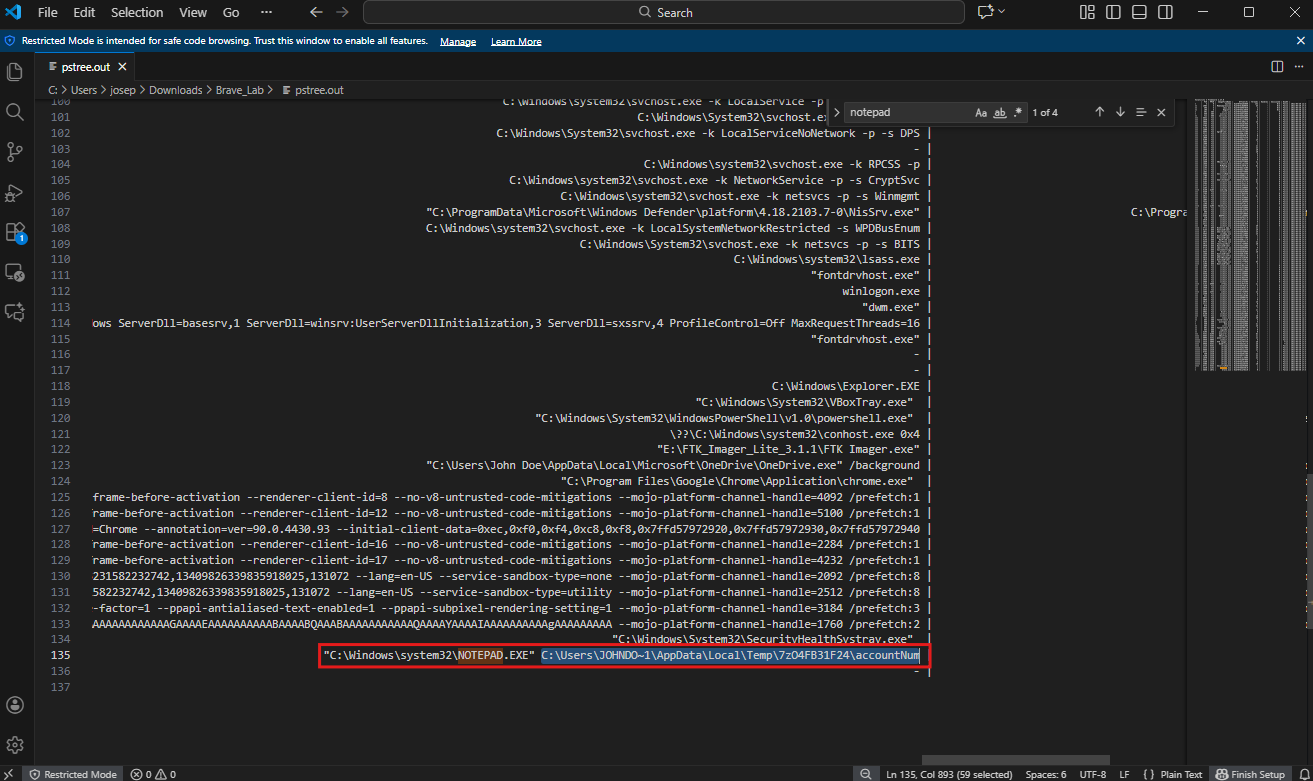
This path reveals the temporary directory in the AppData\Local\Temp folder where the file named accountNum was located. This is indicative of a potentially sensitive or temporary file being edited or viewed in Notepad.
Question 10
Question 10: How long did the suspect use Brave browser? (In Hours)
To determine how long the Brave browser was used, the UserAssist registry key was analyzed. The UserAssist key is a valuable resource in forensic investigations, as it tracks applications executed by the user through the Windows Explorer shell. This key stores metadata about application usage, including execution timestamps and the duration the application was active, making it critical for reconstructing a timeline of user activity.
The analysis began with the execution of the following command using Volatility3:
1
python3 ~/volatility3/vol.py -r pretty -f temp_extract_dir/c49-AfricanFalls2/20210430-Win10Home-20H2-64bit-memdump.mem windows.registry.userassist > userassist.txt
This command invoked the Volatility3 framework to parse the memory dump and extract data from the UserAssist registry key. The -r pretty option ensured that the output was formatted in a readable way, and the output was redirected to a file named userassist.txt for easier review. This approach made it possible to focus on specific entries, such as those related to the Brave browser.
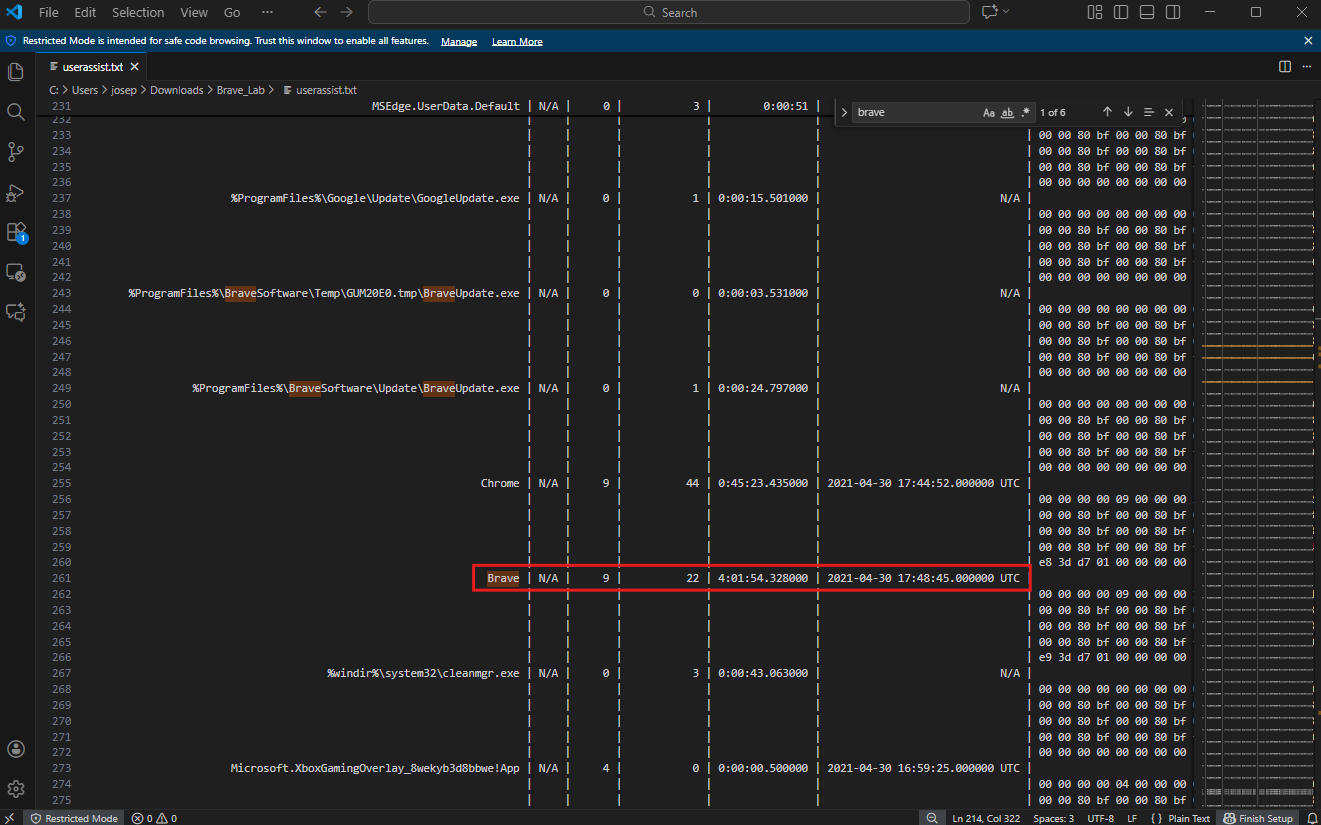
By examining the contents of the UserAssist output, the Brave browser entry was located. The runtime duration associated with this app instance was 04:01:54. This data provides a clear indication of how long the application was active during the time of interest.
The UserAssist registry key is a crucial artifact for building a timeline of user activity. In this case, the information about the Brave browser’s usage duration offers insight into the suspect’s behavior during the specified timeframe. This can be correlated with other artifacts, such as network connections or file activities, to form a comprehensive narrative of the events leading up to the capture of the memory image.
Conclusion
This was another fun lab. I learned a lot more about different Volatility3 plugins and how to search for malicious activity on Windows memory dumps. The biggest hurdle I had for this challenge was that my instance of Volatility3 didn’t have the correct dependecies installed in order to function correctly. I spent a long time (about an hour) trying different versions and troublshooting various solutions, but the solution that worked was that I just needed to read the README file all the way through! Memory forensics is insanely interesting in the fact that you can draw such accurate timelines of malicious activity and find the root cause of that activity. I love digital forensics and DFIR.